


Numerous leaks on the internet have all but confirmed the imminent arrival of a 7-inch version of Apple’s wildly popular iPad. Expected to be announced on October 23, 2012, sightings around the internet put the new tablet starting at anywhere from $250 to $320 for a wifi-only version. Substantial rumors also point to a 3G/4G version as well, putting it an advantage over wifi-only, 7-inch Android-based tablets like Google’s Nexus 7 and Amazon’s Kindle Fire.
What this means for you:
If you are one of the few people on the planet that doesn’t already own an iPad, and don’t because of the size/weight of the current 10-inch tablet, the “iPad Mini” may be worth a look. However, 7-inch screens have many limitations when it comes to browsing the web and working in business applications – your screen real estate is literally half of what you can normally see on even the first generation iPad. Seven-inch tablets have found a very comfortable niche as e-readers, casual gaming devices, and fit remarkably well into over-stuffed carryons for frequent travelers. Expect some transition troubles for your popular iPad apps as they resize the display resolution for the 7-inch screen, and the possibility of paying for a new, “mini”-version of the same app you probably already own.
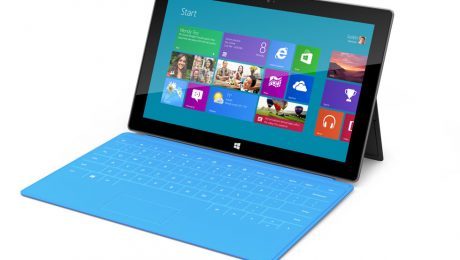
Microsoft has confirmed the arrival of its new tablet, dubbed “Surface” via press-only invitations to a launch event happening on October 25. Following the conclusion of the event, the tablets will actually be available for sale at Midnight PST via Microsoft’s website as well as the actual brick and mortar retail stores – 27 locations in the US as of this writing. The new tablet will be running Microsoft’s new operating system, Windows 8, and will come with a keyboard integrated into the built-in cover. Pricing is still not definite, but most analysts think the tablets will range in price from $500-800, making them slightly pricier than the current tablet champ, the Apple iPad.
What this means for you:
If you’ve been waiting for a “Windows” tablet with bated breath because your business is firmly entrenched in the Microsoft camp, or your IT department is slow to incorporate the beloved iPad into their technology implementations, I wouldn’t hold your breath that the arrival of Surface will change that timetable in the immediate future. Windows 8 is still very much untested in the corporate IT space, and the business world at large will be predictably slow in adopting it, as most businesses are only just starting to adopt Windows 7. Tablets, like laptops before them, represent a difficult challenge to most IT departments in terms of managing both the hardware as well as the data on them because of their highly mobile form-factor.
The arrival of a “Windows” tablet may allow for a more corporate style of tablet usage, with the underlying expectation that because the tablet is based around Microsoft technology, that it will be easier to manage from a corporate perspective and able to leverage existing investments in MS platforms. If you are the adventurous type and don’t already own an iPad or Android-based tablet, the Surface may be worth investigating, but don’t expect a robust app choice until (and if) the device can carve a niche into the existing tablet marketplace.

CORRECTION: iOS 6 will work on iPhones from the 3GS version up. Thanks to Dave McAdams for catching that!
Apple will begin pushing the iOS6 update to its mobile device platforms on Wednesday, September 19, 2012. Along with the expected performance improvements and bug fixes, there are a handful of features that may of interest to Apple users who are not purchasing an iPhone 5.
Here are the most important changes:
- Google Maps will be replaced by Apple’s own Maps application
- Passbook is a brand new Apple app that they intend to replace paper ticketing for things like travel, movies, loyalty cards and more
- Facebook is now integrated into most of Apple’s native applications
- Siri’s search capabilities have been expanded to include things like sports scores, movie times, restaurant reservations and launching apps. It will also work on the latest iPad and the iPhone 4s, but not on older mobile devices.
- You can sync your Safari tabs between your mobile device and desktop Macs via iCloud.
- You can share photo streams with other iOS 6 users, as well as stream your photos to your Apple TV.
- Facetime can now be used on cellular networks, not just wifi.
What this mean to you:
If you are using an Apple mobile device that is NOT an iPhone 5, 4s 3GS or newer, or the 3rd generation iPad, then there’s nothing you need to worry about, as iOS 6 is not available for your device. However, if you do have a qualifying device, the upgrade will come in “over the air” if you already have iOS 5 installed. You will need to upgrade your iTunes software to version 10.7 if you plan on plugging your device into your computer. Before you upgrade, make sure you backup all of your important data (contacts, music, photos, etc.) as upgrades can go wrong, and if they do, it usually means wiping your device in order to restore it to functionality. Wiping = erasing all your personal data = disaster without a proper backup. If you rely on your phone as a critical business tool, including some 3rd-party apps, you may want to wait until you have some business downtime, just in case the upgrade goes sideways, or causes problems with your apps.
- 1
- 2