


When the pandemic came crashing down on the US workforce last year there was a mad scramble by companies to figure out how to continue operating with a work force scattered to the four winds. On top of the realization that essential technologies like webcams and laptops were suddenly scarce, America’s newest telecommuters had to contend with historically crappy residential internet service, ancient Wifi routers and noisy, poorly furnished home office space shared with new office mates that were, let’s say, less than familiar with professional office etiquette. Even now, as the US eyes returning to some semblance of business normalcy, many companies are considering and even committing to keeping some or all of its employees working from home.
Does your company policy cover working from home?
One of the biggest gaps that companies should be reviewing is if their remote workers are using personally-owned equipment to telecommute. Thanks to tight budgets and stock shortages, many newly-remote workers were pressing family-owned equipment into service with the mindset of it not being a permanent solution. But now that many companies are considering making telecommuting a permanent part of their company, they need to account for the use of technology that isn’t owned or managed by the company itself. If employees are allowed to use their own personal machines to access work, are those machines properly secured, and if they can’t be made secure, what is the company’s responsibilities and what are the employee’s? Should they provide equipment, or some form of stipend, and if the latter, what’s the policy governing personal use of that equipment?
Working remotely also requires healthy, fast internet secured by a properly-maintained firewall. Should the company pay for that employee’s internet? What if that worker’s internet quality makes working from home difficult? What if that internet is shared by other household members who don’t work for said company? What if that firewall inhibits said household from properly enjoying other non-work activities? Most residential ISP’s make it difficult to set up separate internet circuits to the same address, and in many cases, the home’s wiring cannot accommodate it even if the ISP is willing to do so.
Is your company’s management prepared to evaluate the performance of a workforce that they cannot physically supervise? Does your company require the remote employees to keep rigid office hours like they did while in the office, or does your policy allow for more flexible schedules, or is it a mixture of both? What facets of their duties govern how that remote worker manages their time, and how much is that influenced by the company’s culture and management style?
At minimum, company management should review their existing employee policy to make sure that it is revised to cover a new type of working environment and new expectations for their remote workers. Many of the decisions will need to be reviewed with HR and legal counsel to make sure they fall within your localities labor laws, and of course, whoever manages your company’s technology.
Image by StockSnap from Pixabay

Despite their semi-public presence, it seems that ransoming a company that provides fuel to most of the eastern seaboard drew a little too much heat for the Colonial Pipeline hackers. Cybercrime researchers Intel 471 are reporting that the ransomware group Darkside has essentially ceased operations after it appears its technology infrastructure was disrupted or dismantled and as much as $5M in crypto currency was seized by unnamed law enforcement entities.
Chalk one up for the “Good Guys”?
In a statement published in Russian to its “affiliates” Darkside wrote:
A couple of hours ago, we lost access to the public part of our infrastructure…
The hosting support service doesn’t provide any information except “at the request of law enforcement authorities.” In addition, a couple of hours after the seizure, funds from the payment server (belonging to us and our clients) were withdrawn to an unknown account.
In view of the above and due to the pressure from the US, the affiliate program is closed. Stay safe and good luck.
The landing page, servers, and other resources will be taken down within 48 hours.
The moral underground? Ransomware operators retreat… | Intel471.com
In case you missed it, Darkside was presenting themselves as a Software-as-a-Service (SaaS) company but instead of offering cloud-based email or data processing or point-of-sales, dark web shoppers could get access to a turn-key Ransomware platform they could turn loose on their own “customer base.” According to some estimates, Darkside netted nearly $90M in cryptocurrency fees paid by its clients over the course of its relatively short life, and it seems other outfits who shared a similar business model were also equally successful. Fortunately for the rest of us who are trying to make money without committing crimes, when the RaaS purveyors also adopted other more traditional trappings of the business world, namely centralized infrastructure and fee collection, they created a target that law enforcement could leverage to dismantle their operations.
While eliminating these highly-visible (relatively speaking) threats should be taken as a positive, you can bet that other operators are taking notes and learning lessons from their fallen brethren who have encouraged their successors to maybe avoid instead of seeking the limelight. As we all know, scaling in the business world definitely means more profits, but you’ve got to be ready for the scrutiny that comes with it. Selling software is an honest living, unless your software is used to extort millions, in which case an audit is the least of your worries.
Image by Gerd Altmann from Pixabay

Last week, a five-thousand mile fuel pipeline that spans the country from the Gulf Coast to New York was shut down by company operators because of a ransomware attack that had compromised parts of their technology infrastructure. According Colonial Pipeline Company, the pipeline wasn’t shutdown by the attack itself but enacted as a precautionary measure. Though some parts of the pipe system which normally delivered nearly half of the East Coast’s jet, diesel and gasoline fuel supply have been brought back online this week, Colonial is still limiting operations while it deals with its compromised technology infrastructure. Several researchers and news outlets have identified a relatively new APT group Darkside as the perpetrator of the attack, a self-proclaimed, Robin-Hood-style organization that has publicly stated it will not target certain types of organizations, like non-profits, hospitals, and who supposedly donates some of its ransom to charities.
I’m sorry, what?
In keeping with their own “branding,” Darkside published a statement on their darknet website that reads as a back-handed apology for attacking the pipeline:
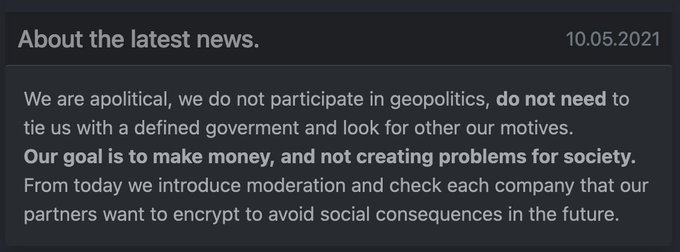
We are apolitical, we do not participate in geopolitics, do not need to ties us with a defined goverment (sic) and look for other our motives. Our goals is to make money, and not creating problems for society. From today we introduce moderation and check each company that our partners want to encrypt to avoid social consequences in the future.
https://twitter.com/ddd1ms/status/1391741147001892869
While it might seem encouraging to think there may be hacking groups out there with a code of honor, you should not mistake them for being a champion of the poor, and they state it quite baldly that their goal is to make money. Their avoidance of political targets may be a shrewd attempt at sidestepping attention from governments, especially ones like the US which can afford to focus a lot of heat on groups like Darkside that appear to operate without nation-state backing. Or at least that is what they would have you believe. Is it a smokescreen, or just a front for another state-sponsored cyberattack from our geo-political rivals. Only a truly naïve group would think that targeting an fuel distribution company in an oil-dependent country like the US wouldn’t have significant social and political ramifications. Also, that semi-apology note didn’t include any decryption keys so, “Sorry, not sorry?”
Image by Pete Linforth from Pixabay

The previous two blogs have walked through some of the basic structure and background of Microsoft’s complex, cloud-based account platform, and we’ve touched somewhat on the reasons why you might have one or more Microsoft accounts. You will definitely have one if you’ve ever had a Hotmail.com or Outlook.com email address, and less common a Live.com or Passport.com email address. You will also have a Microsoft account if you have or had an Xbox Live gaming subscription or used Skype on a mobile device, if you owned a Zune, their personal music player or the short-lived Windows phone. If you have some form of 365 service, whether it be email services, desktop Office applications, OneDrive, Teams or any various combination of those services, you will also have one or more Microsoft accounts that anchor those services.
The compelling argument for the Microsoft account
Marketing opportunities and conspiracy theories aside, there is a compelling and intentional use case for the Microsoft account, one that you might already be “enjoying” with a competing set of devices: Apple’s iCloud. In case you are unfamiliar with Apple’s similarly nebulous cloud-based account platform, the intent, just like Microsoft is for you to have one account that grants access to all your services, settings and data across all devices you own. In today’s implementation Microsoft is definitely chasing Apple’s service in this regard, even though the Microsoft account concept predates iCloud by a number of years. When iCloud evolved into it’s current iteration in 2011, Windows had already been using roaming profiles in Windows since 1993!
Regardless of who was first, the primary reason for using the Microsoft account is to (ostensibly) provide the ultimate portable, roaming profile. In essence, Microsoft (and Apple) would like you to store all your data, settings, passwords, browsing history – everything – in your cloud account which would allow you to use any compatible device and service, anywhere in the internet-connected world in conjunction with your account, providing you with a consistent, familiar and convenient digital environment. When done right, both platforms offer a surprising (and sometimes unsettling) experience whereby logging into a brand-new device almost instantly transforms it into a device that knows who you are and how you work without any tweaking of settings, looking up of passwords, or laborious transfer of documents and pictures. It’s the digital equivalent of buying a new pair of jeans having them instantly fit just like your old, tattered but perfectly-fitting old pair. Note the emphasis on “when done right,” as the Windows account implementation can be difficult to navigate, primarily because many Windows users have multiple accounts on top of having different services attached to the various accounts, which leads to the exact opposite of what the Microsoft account was supposed to do. Also note that if you intend to keep work and personal life separate on separate devices, it’s definitely possible to mix them all together if you aren’t very careful about which Microsoft account is logged into the various services, and disentangling them can be a confusing and frustrating experience.

Last week I wrote about the Microsoft Account that you may or may not be using properly on your Windows 10 machine. Thanks to some very poor user interface decisions from the Windows 8 days as well as Microsoft’s behind-the-scenes efforts to move their vast Hotmail/Outlook.com/Live.com users into a monolithic (sort of) platform, it’s highly likely that you have at least one or more Microsoft Accounts tied to your email addresses, regardless of whether they are Microsoft webmail services (Hotmail.com, MSN.com, Passport.com, Live.com, Outlook.com as well as all the international variants) or another popular “free” or bundled provider like Gmail, Yahoo, SBCGlobal, Pacbell, Roadrunner, etc. Also, if you subscribe to Office 365, either via a personal subscription for desktop versions of Office (Word, Excel, Powerpoint, etc) or for business emails with your company’s domain name, you have a Microsoft Account to which those services are tied.
How do I know if I’m using a Microsoft Account with my Windows PC?
It’s pretty easy to spot. Go to the Windows menu and select Settings (the gear icon) -> Accounts. In the window that pops up you should see your name and/or an email address. If it says “Local Account” you are using the “traditional” Windows profile that is not directly connected to the Microsoft Account platform. If it shows your name and an email address and right below that “Manage my Microsoft account” then you are logging into Windows with a Microsoft Account. The third option you may encounter will be an Active Directory domain account which will be very uncommon in home and small business environments. Depending on the type of AD account, under your name may appear your domain login which may be an email address OR may appear as “domain\username”. The key difference is that it will not say anything about managing your Microsoft account under your user name.


Why is this important?
If you are using a local or Active Directory login, your Windows login password is not controlled by the Microsoft Account platform. For local accounts, the password is machine specific and can only be changed on that machine and only by an administrator on that machine, which is usually you. Active Directory passwords are controlled by your domain administrator (usually your work’s IT team) and can be changed by you or your administrator (depending on the rules they have established), and may be changed regularly per your company’s policy. If you are using a Microsoft Account login and happen to change the password of that account, say in the course of updating your Office 365 Home subscription or changing a credit card on your Xbox Game Pass account, it changes the password you will use to log into your Windows PC but does not highlight that as a possible consequence. What confuses people is that they sometimes change that password from a completely different device (even on an iPhone or iPad) using Microsoft’s website and then when they get back to their Windows PC, discover that they can’t log in with their usual password. On top of this, you may have added a PIN or some other biometric login (face recognition or fingerprint) and if you change credentials it will sometimes invalidate those login processes as well, meaning you will HAVE to use the Microsoft Account password to get into your computer.
Next week – why you would want to use a Microsoft Account for your Windows login, and why not.

When Microsoft introduced Windows 8 they introduced a new “feature” in the wizard that walks you through the process of setting up your new PC. This new feature was the ability to use a Microsoft account as your user login on the PC instead of the traditional user account that has been used for years with prior versions of the Windows OS. Unfortunately, they did an extremely poor job explaining what this actually was, or how it worked. This feature is still used extensively in Windows 10 PC’s today, it is still not explained well in the wizard, it’s still difficult to understand and can cause quite a bit of confusion when used unintentionally.
What this means for you
If you’ve ever walked through the process of setting up a new computer, you’ve come across and probably implemented this feature without even realizing the extent of it’s capabilities or how it differs from the “old” way of creating an account for your PC. Since the very early days of Windows, most people interact with the operating system and their apps through what’s known as a user profile. The profile mechanism allows more than one person to use the same hardware while retaining their own set of data and settings. On home PC’s typically you only had one profile and in versions past, you might have had one set up without a password, not realizing you were even logging into a profile at all. Up until Windows 7, this profile was a “local” profile on most personal and home PCs and for most users was something the only had a vague awareness of, if at all.
Starting with Windows 8, Microsoft implemented the means for a local computer profile to be synced to the internet, ostensibly to back up your settings and password to a “cloud profile” that was tied to your Microsoft Account. Though its intent wasn’t clear at the time, the end goal was to allow you build a profile that could be moved from PC to PC as you upgraded your hardware, or used on multiple PCs simultaneously, giving you perfectly synchronized data across all of them through the magic of the internet. Except at the time, Microsoft didn’t explain any of its vision at all well during the process, and we actually wouldn’t see the full vision realized until the arrival of Windows 10 and OneDrive many years later. On top of this, they would typically funnel you into creating a Microsoft Account by using your email address, which most people mistook for Windows just asking for their email password which, if your email account was provided by Microsoft, is actually what they are doing, but if you give them an non-Microsoft email account (say Gmail or AOL) then you would be prompted to create a Microsoft Account on the spot using your email address as the login name. Not confusing at all, right? This resulted in tons of questions: “Is Microsoft taking over my email?” “Am I converting my Gmail/AOL/Yahoo email into a Microsoft email?” “Which password should I use to log into Windows?” “How do I access my Microsoft Account?”
Now, let’s add Office/Microsoft 365 into the mix. With the arrival of Microsoft’s cloud platform, it’s actually possible to have TWO Microsoft Accounts that use the same email address. Let’s say you have your own domain name and email account, and you’ve just recently moved hosting to Microsoft 365. But prior to that, you set up a Microsoft Account using that same email address. Whenever Windows needs to access your Microsoft Account it will ask you for your email address, and if you happen to have two accounts, it will present you with a choice to pick between your Work or School Account or your Personal Account. But depending on which service you are accessing – let’s say your Xbox Game Pass subscription (Personal Account) or your OneDrive account (might be work, might be personal, you probably have both!), or even setting up your new PC with a new profile. You can use either one!! But which one to choose?!?
Next week – more details on Microsoft Account Madness!
Image by PIRO4D from Pixabay

Despite the fact that a database containing personal information scraped from Facebook on over half a billion people has appeared on the internet and is available for anyone with a modicum of technical skill, Facebook doesn’t appear to be concerned at all, dismissing this particular news with a hand wave, “This is old data that was previously reported on in 2019…We found and fixed this issue in August 2019,” per email statement sent to the Associated Press. And it seems they have good reason to downplay this “old news” as its stock hits a record high despite facing news that would be catastrophic for just about any other company. Unfortunately for us, this issue they “fixed” in 2019 might have been any number of security problems they had in that year, and yes, this database may be an amalgamation of several breaches. Which doesn’t make it any better.
What this means for you
To put this in perspective, here is a visualization of just how big a number 533,000,000 actually is:
![r/dataisbeautiful - If all 533 million compromised Facebook accounts were a country [OC]](https://preview.redd.it/70sdgx6s55r61.png?width=960&crop=smart&auto=webp&s=b4d2a884602617d2e9f6d9bfe69f1190f629a2fa)
The above is just the first of 4 slides so click through for other 3 slides – it’s worth a look. The amount of data leaked is larger than the population of the USA. Unfortunately for the world, the leaks seems to have been global in scale, affecting 106 countries in total and over 32 million Americans. On a personal level, the data contains information that would be classified as Personally Identifiable Information including names, physical addresses, phone numbers and email addresses. This is enough info to put your identity at serious risk (if it wasn’t already before) for theft, and as such, at minimum you should be putting a freeze on your credit reports. This leak may also pose a risk for anyone who has a need to keep such data private, such as celebrities, or abuse/stalking victims, or just your regular social media user who had no idea their “personal” information could be made so widely available.
Seeing as Facebook does not seem to be taking any sort of ownership on this, you will have to rely on third-party site HaveIBeenPwned.com to see if you were one of the 533 million affected by this latest leak. At this point, even if you weren’t affected by this particular breach, I can almost guarantee that if your email address is more than year old, you are likely still going to find yourself on that site. You can also check at this newer site by phone number, just to cover all the bases.
Some of us maintain Facebook accounts because we have to, but if you aren’t using it anymore or want to stop using it because this was the last straw, you can delete your account here: https://www.facebook.com/help/224562897555674. On top of this, you should be:
- Using two-factor authentication for all your important email, financial and work-related accounts,
- Backing up your data to the cloud via a reputable platform like BackBlaze, Carbonite or iDrive
- Using unique, complex passwords for everything, and
- Managing those passwords through a like LastPass, 1Password, Dashlane or Roboform.
Oh, and you put a freeze on your credit reports, right?
Image by Tumisu from Pixabay

Last week I wrote an article about another mega-corporation that starts with “A” that presents a more benevolent public image than they actually behave, but in the case of AT&T, I don’t think anyone mistakes them for a business with a progressive ideology. As a matter of fact, you could say their latest blog as purportedly written by one of their executive VP’s is exactly the opposite with a very conservative view on what America needs in terms of internet speeds. The blog appears to be in response to the Biden administration’s call to define a new baseline for internet broadband at 100mbs for both upload and download speeds as well as proposals from the Administration and Congress to subsidize infrastructure development in under-served geographical and income-challenged populations.
What this means for you
Let’s cut to the chase: AT&T believes that rural America doesn’t need 100Mbs upload speeds. As a matter of fact, according to their blog post [emphasis ours]:
“The pandemic has broadened the consensus opinion that it’s time to revisit the FCC’s current broadband definition of 25/3 Mbps. To be clear, service at that speed is sufficient to support zoom working and remote learning.“
Defining BroadbandFor the 21st Century – AT&T Public Policy
To be fair, they do go on later to say that the 25Mbs download speed is less than optimal for a family of four, especially in light of the pandemic. But what they are objecting to is the current Administration’s attempt to redefine the baseline standard of broadband any higher than their current infrastructure can support, and a 100Mbs upload speed is way more than their ancient DSL (top speed of 3Mbs in most areas) networks can handle. They are also objecting to the proposals that would provide billions of dollars in subsidies to competitors, including municipal-backed co-ops and smaller ISPs that would challenge their monopoly (or duopoly if you are lucky) in most broadband markets, including urban and commerce hubs. I’m pretty sure they know that most Americans, given a choice, will absolutely consider other options, especially if they are competitive (and not AT&T), and AT&T hasn’t had to compete in decades in a large part of their market. Hopefully the current administration can push forward some serious upgrades to the nation’s infrastructure that includes establishing a broadband speed standard in every part of the country, breaking the monopolistic inertia that is holding large swaths of our population hostage with 90’s-era technology and speeds.
How can you do something about this? Contact your elected officials and let them know you want faster internet and a choice of providers. This isn’t a partisan issue – everyone should have fast, affordable internet.
Image by kewl from Pixabay

If there is one thing that has been consistent with the Apple brand throughout the years, it’s that they have a fiercely loyal customer base that has expanded from what was once a very small percentage of the market, to worldwide dominance through their mobile devices. The reasons why Apple’s brand is so popular could be the subject of numerous dissertations on the power of marketing, psychology and design aesthetics, and for the most part, their hardware and software has consistently been of high quality (with a handful of high-profile exceptions) since the very first Apple computer took the world by storm. If you are choosing Apple products for their hardware, software, or design aesthetic and can afford their comparatively higher cost, I find no fault with that reasoning. However, if all other things being equal (hardware, software, design) when determining which brand to pursue, and you select Apple based on their perceived ideological stance, it may be worth considering the below.
What this means for you
Since taking over for Steve Jobs in 2011, Apple CEO Tim Cook has work studiously and successfully to elevate Apple’s branding to represent the company as having a more socially and environmentally conscious stance. This includes several, high-profile incidents such as where he challenged stockholders to sell if they disagreed with Apple’s increasing investment in renewable energy, Apple’s public filing of a friend-of-the-court brief on Trump’s intent to cancel DACA, and most recently in the spat with Facebook over recent changes to the Apple iOS to provide more transparency on the apps that track their user’s activities. While there is nothing wrong with these stances – they are each of them laudable – these are the ones that Apple wants you to recognize them for, and not for other, more questionable decisions, such as their removal of a Hong Kong protest app at the request of the Chinese government, and most recently, their change in policy to allow phones sold in Russia to prompt users to install state-approved Russian apps, something they have never done for any other country or market…until now.
As I’m sure you are aware, Apple is a publicly traded company and is, in the end, beholden to its shareholders, regardless of its stated ideals. Yes, Tim Cook told disgruntled investors to sell if they don’t like Apple’s decision to invest in renewable energy sources, but as time has since revealed, this appears to be a shrewd forecasting of the world’s turn towards renewables. Likewise, Apple punished Facebook in January of 2019 in a highly-publicized incident where Facebook was revealed to be using an app to scrape users phones for data. Apple appeared be championing privacy for its users, but in fact the punishment levied against Facebook was for violating the licensing terms Apple extended to Facebook for the app – the license granted Facebook the ability to distribute apps for non-public apps, which this “research” app was clearly not. They were not punished for the intent of the app nor did Apple address the fact that participants were paid by Facebook for access to their data.
Social media has popularized a concept known as “virtue signaling” (controversial on its own) which seems to fit Apple’s publicity model. While Wikipedia’s definition seems to imply that Apple (as a company) should not been seen as a champion of human rights while quietly doing the opposite when it serves them, they aren’t the only company doing this, and this is not something new to for-profit companies. In the advertising world, this is known as “good branding” and Apple, if nothing else, is a textbook example of excellent brand management. Make no mistake, as long as you recognize Apple (or any other company behaving similarly) as company with a bottom line and not an entity forwarding an agenda, their ideological stance should be viewed first as a marketing strategy and evaluated on what they do, and not what they signal.

I would hazard a guess that a large percentage of Facebook’s user base was actually alive at the time it was first created as a dating app for college students, but it’s very clear that a significant portion of Facebook users now look upon it as an (if not their only) authoritative information source, valuing the opinion of their social circles more than scientific evidence and fact-checked expertise. An internal Facebook study has confirmed that a very small number of accounts out of the 3.3 billion total on its platforms (including WhatsApp and Instagram) account for half of all “vaccine hesitancy” content appearing on the platforms. While Facebook has only recently started banning false and misleading content related to the Coronavirus Pandemic, apparently there is still a vast amount of content expressing concerns about vaccine effectiveness or severity of side affects.
What this means for you
Conversations about vaccine hesitancy and fears are considered nuanced enough to fall well short of being labeled as “harmful” and rightly so – Facebook is a place for people to share their opinions. However, when those opinions are formed from what may have been deliberately planted misinformation, they can sway large swaths of populations into making choices that may prove detrimental to everyone’s health, such as vaccine reluctance in 30% of Americans. According to the Facebook’s own study, there appears to be 111 accounts that were the source of half the content published on Facebook that is causing a widespread distrust of a vaccines. Social media communities, especially ones that identify around a single (possibly controversial) belief tend towards reinforcing narratives instead of challenging them. The basic human need for validation has always created “echo chambers” in society, even well before the internet, but the size and speed of platforms like Facebook allow for the viral spread of both harmless fun and extremely harmful ideology with horrific outcomes.
To deliberately misquote a line from one of my all-time favorite movies, “What can we do against such reckless misinformation?” Riding out on a horse, while glorious, isn’t going to be effective. Make sure you are challenging misinformation by gathering information from a wide variety of sources. Don’t just assume those sources are reputable or trusted because they are on the internet or worse, found in your own echo chamber. Facebook can be a source of information, but as has been demonstrated time and time again, not one that should be fully trusted any time soon.
Image by Pablo Jimeno from Pixabay