


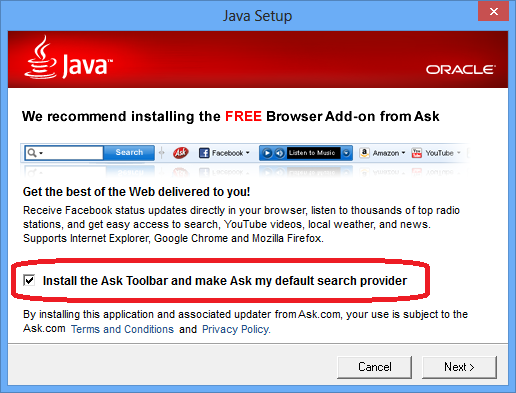
Java’s recent security problems hasn’t stopped its smarmy practice of foisting the Ask-dot-com toolbar or McAfee’s Security Scanner on you every time you update Java. In case you didn’t notice, or were wondering how either of those products got installed on your computer, Java was the likely culprit. This wouldn’t be so bad, except the Java updater uses a trick called an “opt-out” checkbox which most people (who might be in too much of a hurry to get back to working|playing) just assume is part of the default Java update. If you actually look at what it’s asking you install, you’ll notice, “Hey, that’s not Java!”
What this means for you:
If you’ve been a diligent netizen, you probably heeded the countless warnings about the latest flaw in Java and updated it when Oracle released their patch last week. If you are a normal human being, you were probably frustrated with yet another series of dialog boxes filled with barely intelligible technobabble and progress meters creeping across the screen, and you might have accidentally left that checkbox checked, which means you are the proud new owner of a questionanbly useful toolbar from Ask-dot-com. Unless you’ve fallen in love with it (for some crazy reason), I’d recommend removing this software at once.
If you want to read more about why you should do this, have a look at the ZD Net article detailing Ask’s shady takeover of your browser. I’ve not had any personal experience with McAfee’s Security Scanner, but I’ve found just about all third-party browser security “scanners” to be at best, barely functional, and at worst, completely disruptive to normal, safe browsing. Let me know if you’ve had a positive experience with either product!
![Internet_Explorer_7_Logo[1].png](https://c2techs.net/wp-content/uploads/2012/09/Internet_Explorer_7_Logo[1]_0-460x260_c.png "Internet_Explorer_7_Logo[1].png")
In a rare, out-of-band release, Microsoft released an update on Sept 21 that patched the much bally-hooed vulnerability that affected all versions of its browser as far back as IE 6. This security flaw was significant enough to warrant the German government recommend to its citizens that they use another browser until MS could address the exploit, which it did on the 19th in a “fixit” tool downloadable via their website, and now in an MS Update that will be delivered automatically to all validated Windows OS systems.
What this means for you:
Microsoft normally releases its updates on Tuesday, so the more savvy among you might have already noticed the unusual appearance of an update request from your Windows machine as early as last Friday evening. Regardless of when you see it, you should allow update to download and patch your OS as soon as possible, especially if you use IE as your internet browser. If your computer is managed by a corporate IT department, the update may go through internal testing before being released to update your computer. Assuming you’ve not made any changes to how your OS stays up to date, you should be patched, or will be patched the next time you reboot your computer. To make sure you’ve received this update, you can visit your Control Panel, open Windows Update and check your update history for “Cumulative Security Update for Internet Explorer (2744842)”. If this has been successfully installed, you been patched!
- 1
- 2