


It must be another day ending in “Y” as hackers are making headlines again: Airplanes, cell-phone chargers and now your car might be the target of hackers. As you might have already guessed, auto manufacturers have been building computers and networks into cars for years now, and modern models can have as many as 70 different computerized systems that control every aspect of the car: braking, steering, acceleration, etc. Where there’s a computer, hackers are sure to follow, and security experts have successfully demonstrated hacks on late model cars that can take over just about any aspect of computerized systems including slamming on the brakes full the car is at full speed, jerking the steering wheel and shutting down the engine completely.
What this means for you:
Before you drive your shiny new ride over to the nearest Cars for Causes office and pack the family off to that bunker in Montana, you should know that the hackers in question worked for months to crack the auto systems on a specific model of car, and in most cases the hacks required physical access to the vehicle. However, according to past reports, ethical hackers from UCSD have managed to compromise at least one late-model GM vehicle via wireless methods, and it’s hard not to imagine that as automobiles become even more complex and automated (Google’s self-driving car, anyone?) as well as wirelessly connected to the internet, the unethical hackers won’t be far behind in tarnishing what otherwise might be a bright, self-driving future.
Image courtesy of Sura Nualpradid / FreeDigitalPhotos.net

In a move that surely caught Hollywood by surprise, Canadian company Bionym has announced the imminent arrival of a biometric authentication device dubbed “Nymi” that relies not on retinal scans or fingerprints or even handprints, but upon the beating of your heart. As with many things human and organic, the particular rhythm of your cardiac system is unique to you, and the mad scientists at Bionym are leveraging this fact as part of a 3-factor authentication system that will allow you to use the bracelet for a variety of applications, not the least of which will be unlocking your devices, accounts and just about anything that can be communicated to via bluetooth or NFC.
What this means for you:
Just about everyone, including yours truly, grumbles about how inconvenient password authentication really is, despite knowing just how bad it could be without them. Nymi has the potential to leverage biometric security measures in a way that doesn’t rely on easily defeated fingerprint readers or expensive and uncomfortable body part scanners. This type of 3-factor authentication puts a twist on traditional two-factor methods (password + device) and instead substitutes your cardiac signature plus physical contact with your skin for the password to unlock the Nymi, which is also tied to another device like your smartphone for a third verification. Absence of any one of the 3 factors make authentication impossible, and mere possession of the device doesn’t prove ownership as it does for current-gen proximity devices like the Skip.
It almost sounds too good to be true, and the demo video released by the company has a distinct sci-fi feel that will probably provide at least one eyebrow-raising moment for any first-world citizen. But when you stop to think about the various demonstrations, each one already has an existing, real-world corollary that while maybe not in widespread use yet, could easily become commonplace tomorrow, especially if Nymi takes off. I believed enough in the promise to pre-order mine (#1141). Heck, for $79, at minimum it will make for a great conversation piece at parties, and if all it does is keep my cell phone securely and safely unlocked while I’m near it, I’ll consider it money well spent.

Confirming what many commercial security companies already claim, a security bulletin published on the Public Intelligence website by the Department of Homeland Security and the Federal Bureau of Investigation identifies the Android OS as the most attacked mobile operating system. Nearly 80% of all malware threats in 2012 targeting mobile devices were focused on Google’s platform. The distant second place (19%) was held by Nokia’s Symbian OS, most commonly found on older feature phones. At the other end of the spectrum was Apple’s iOS, which despite being one of the most popular mobile devices on the planet, was only targeted less than 1% of the time in 2012.
What this means for you:
The malware focus on Android is not unexpected: the platform is fractured across multiple versions and multiple carriers, and there are hundreds of thousands of phones running older versions of Android that have well-documented security flaws that have been fixed in later versions. Unlike Apple’s relentless updating of the iOS, many Android phones rely on the carrier to push OS updates, which they do reluctantly, if at all, especially to hardware lines that are no longer being sold or considered a significant portion of the market.
Unfortunately, the carriers have also locked down the OS on many models, requiring a series of highly-technical processes to “unlock” and “root” the phone to force an update to the OS. Of course, doing so voids any warranties with the carrier, and has a chance of “bricking” the phone itself if the process is done incorrectly, or if it is updated with an OS that has bugs or is incompatible with that specific model phone.
Here are some things you can do if you find you are using an Android phone running an older version of the OS:
- Contact your carrier to request an OS update. If they tell you one is not forthcoming immediately, or that your particular model is essentially no longer receiving updates, let them know you are concerned about security flaws in the older OS, and ask for an upgrade to recent model phone.
- Whether or not a new Android phone is in your future, you should be extremely careful about “sideloading” apps. Only install apps from Google’s Play store, and be very careful following app install links from anyone. Instead, get the name of the app you want to install, go to the Google Play app already installed on your phone, search and install from there. If you can’t find the app, it’s likely the link was to a sideloading site (and potentially unsafe), or a disguised attempt to get you to install malware on your device.
- Install a malware protection app. Several reputable companies make apps for Android. I’ve been using SecureAnywhere from Webroot for several months now, without issue, and I will soon be testing Kaspersky’s app. Look for a name you recognize, and give their app a try. Some of them might slow your phone down on ocassion as they scan for issues, but the temporary inconvenience may save you from serious heartache later on.

News has surfaced via various outlets that Microsoft has finalized the “.1” update to Windows 8. This has a two-fold implication for everyone: first, manufacturers can now start to build PCs with 8.1 instead of 8 (which may help flagging sales), and consumers can expect the major update to arrive in October, as originally promised by Microsoft. Among the improvements promised in this update, only two are likely to raise an eyebrow with most folks: the “return” of the Start menu and a more easily accessible Desktop Mode which can now be set to load on bootup. The quotes around return are explained below.
What this means for you:
Based upon dismal sales numbers, it’s likely you’ve been holding off on adopting Windows 8 unless you were forced to through the purchase of a new PC, or you were among the technically adventurous/curious. I’ve warned many of my clients away from taking on the Windows 8 “adventure” primarily because of the significant changes to the user interface. To say the differences are jarring and a productivity killer in the first few months of adoption would only be a slight exaggeration, and depending on how savvy you were with technology, that learning curve was the dealbreaker.
However, now that Microsoft has graciously given us the option to enable “Desktop Mode” by default, new users can ease into the transition using an interface that is essentially the same one they’ve used the past 10-15 years. On the other hand, the return of the “Start Menu” isn’t what you think it might be. Yes, there’s an icon in the lower left, as in past versions of windows, but it merely acts as a shortcut to the Windows 8 “Start Screen”. Granted, Microsoft supposedly has made many improvements to this interface, so it may not be all that bad, but if you want a menu like the one in Windows XP/Vista/7, you’ll need to stick to third-party addons like Pokki.

An Islamist hacktivist going by the moniker “Mauritania Attacker” claims to have hacked and accessed the entire database of Twitter accounts. As proof of this exploit, he has published details on 15,000 accounts that included access tokens users have generated for other applications that use Twitter either as an authentication source, or as a means to publish data from or to the microblogging service. According to representatives from Twitter, no accounts have been compromised, and the account details released by the hacker did not contain passwords (hashed, encrypted or otherwise). Security analysts suspect that it may be possible to use the exposed security tokens to gain limited access to publish through the associated Twitter account via third party app (which is what the tokens are for in the first place) if a hacker could ascertain for which app a specific token was created.
What this means for you:
If you use Twitter, you should do two things:
- Enable login verification by going to your Twitter settings -> Account -> Login Verification. This basically sends out a confirmation to your mobile device that must be entered in order to log into your Twitter account.
- Revoke permissions to Twitter-enabled apps. You can do this by going to your Twitter settings -> Apps and clicking “Revoke Access” next to every app on the list, even the ones you might use frequently. Then, you can go back to your favorite apps and reauthenticate. This way, you can recreate the access tokens, and not have to worry about the possibility that your access tokens were among the ones shared by the Mauritania Attacker.

Motorola has recently announced a near-field communication (NFC) device called the “Skip” which can be paired with their new Moto X smartphone to allow for quick unlocking of a PIN-protected device. The small wearable device also comes with a handful of “Skip Dots” which are smaller versions of the Skip that can be placed at frequently visited locations like your car or desk, allowing the same, “tap to unlock” functionality offered by the Skip device. According to Motorola, the Skip will supposedly save the average user quite a bit of time, based upon a calculation that we spend on average 2.9 seconds punching in our PINs up to 40 times a day.
What this means for you:
This particular idea isn’t new. NFC dots/stickers have been around for awhile, and many Android phones feature the capability of using the presence or absence of NFC points to give Android phones locational awareness at a level much finer than afforded by GPS. Depending on how they are programmed, Android phones can automatically unlock themselves when near specific dots, or enable Bluetooth when near a dot placed in a car, etc. The problem, as you can imagine, is that it gives thieves and malicious actors the ability to unlock a stolen or misappropriated phone merely by possessing the “Skip” itself. Seeing as it’s attached via magnets, and likely to be near the phone itself, gaining both items gives the possessor the literal keys to your smartphone’s kingdom. The Skip Dots also add another easy vector for malicious actors who are familiar with the phone owner, such as a co-worker, fellow student or roommate, and take advantage of an unattended phone and a known Skip Dot location.
Smartphone PINs are there for a reason: to make it difficult to unlock your phone. What’s the point of putting a lock on your front door if you are going to leave the key sitting in plain view for anyone to use? My advice to you: don’t use devices like the Skip (or any NFC device) to bypass security. It’s there for a reason, and imagine how inconvenienced you would be if your phone (and everything on it) was compromised.
-460x260_c.png "Google_Chrome_icon_(2011).png")
It pains me to criticize a browser that I typically praise and recommend, but I can’t play favorites when it comes to security. An article by Elliott Kember pointed out a glaring security controversy within Chrome that has the various tech ideology camps (hackers, security analysts, developers, power-users etc.) bickering over some of the most basic elements of data security. In a nutshell, Chrome (like all browsers) has the ability to save passwords for any website you visit, and when this feature is enabled (it is, by default) it will ask you politely if you’d like to save that password you just entered for this website. Here’s the controversy: if you go into Chrome’s advanced settings and view the list of passwords saved by the browser, you can actually click on each password and view it in clear text. Not the usual black bullets we’re used to seeing – you can actually read the password. Go ahead, see for yourself. I’ll wait.
I was literally gobsmacked when I found this out, as I have been using Chrome ever since it was released to the public. “They obviously haven’t thought this out!” I said to myself, but it seems that the head of Chrome’s security development thinks otherwise (warning: geeks arguing on the internet – the knives are out!); the basis of his argument is that if someone other than you is physically sitting at your computer and can manipulate the mouse and keyboard to the point where they can get to this screen, then any security precautions Chrome could put in place are essentially null. This is actually a position I share regularly with my clients: if someone has physical control of your device, most security measures like passwords will do much less to protect you than you think. HOWEVER…
What this means for you:
Yes, if someone unsavory has possession of your hardware and are appropriately trained/equipped, even a strong password isn’t going to keep them at bay for long. But what about the time your roomate or co-worker asks to borrow your laptop real quick to do [random, innocuous websurfing task]. Sure, no problem, you close out of whatever sensitive websites you might have open and push it over to him. Let’s say this person’s intentions aren’t completely honorable, but he also knows he doesn’t have much time to go browsing around randomly through your bookmarks or history to see if any website sessions are still valid (ie. you’ve recently entered a password, and a cookie provides convenient re-opening of a website). But he does know that Chrome has this particular flaw, and he quickly glances through the saved password list, memorizing a couple critical ones to use for later wreaking of havoc.
Scared now? It’s not clear whether Chrome will ever fix this “issue” when they don’t recognize it as such. I rarely let anyone else use my laptop or desktop, but I’m still erasing all my saved passwords and disabling this feature. As convenient as it may seem, at minimum you should NEVER save passwords for any sensitive accounts like online banking, email, etc, and if you can stand the inconvenience, don’t let your browser save passwords at all, in any browser on any platform.

You’ve seen it in movies and television probably dozens of times: video surveillance systems being hacked into by both heroes and villains and being fooled into showing looped footage allowing said hero/villain to proceed undetected. This time around, life is imitating art as a security researcher demonstrated at the Black Hat security conference held this past weekend. In his presentation, dubbed “Exploiting Surveillance Cameras Like a Hollywood Hacker”, former NSA worker Craig Heffner demonstrated how he was able to research and exploit readily available internet-enabled video cameras commonly used for security surveillance in homes and businesses around the world. Given the well-honed skeptical nature of Black Hat attendees, Mr. Heffner provided a live demonstration wherein he focused a compromised camera on a bottle placed on stage. While the audience watched via the security console, Heffner hacked the camera to display a spoofed image of the bottle (the “Hollywood” part), and then proceeded to “steal” the bottle while the security camera continued to display an unmolested bottle.
What this means for you:
Unfortunately, Heffner was able to exploit cameras from many manufacturers primarily because the device firmwares contained hard-wired passwords and other backdoor mechanisms. Thanks to the internet, Heffner was able to download copies of many camera firmwares and research the vulnerabilities without even owning the actual device. Heffner contends that he has yet to come across a model of internet security camera that he cannot hack, primarily because the manufacturers have been careless in removing the backdoors and weakness, and that the basic operating system varied in only minor ways from model to model. If you are actively using any of the cameras listed in Heffner’s presentation, you may want to consider disconnecting them from the network (which essentially defeats the “Internet-enabled” part), or disabling them completely until the manufacturers patch the obvious security weaknesses.
Image courtesy of Renjith Krishnan / FreeDigitalPhotos.net
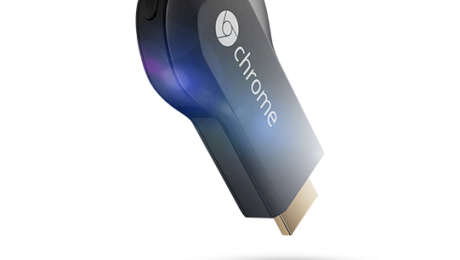
Unlike the hype build-up surrounding Glass which seemed to go on for months, Google stole a march on the media and surprised the world last week with a $35 device called Chromecast which is poised to rock the world of Television. This little gadget is designed to work with any HDMI-capable television or monitor and will stream specific provider content straight to your entertainment center big screen.
Which content providers? How about streaming heavy Netflix and, of course, all of Google’s content offerings, such as YouTube and Google Play music and video. Despite the “limited” content partners named at launch, Chromecast sold out online within hours of the announcement, and retail establishments like BestBuy were cleared out shortly thereafter. As expected, other content providers are jumping into what has the makings of a bona fide internet gold-rush, with both Vimeo and Netflix competitor RedBox announcing apps for the device. Hackers have also uncovered what appears to be hooks for HBO’s Go service, the arrival of which would truly cement Chromecast’s position in the entertainment ecosphere.
What this means for you:
If you are one of the hundreds of thousands of families that has an HDMI TV in your living room and wished there was a way you could watch Netflix streaming videos on it, this is your device. Netflix-capable devices have existed for years: all current gaming consoles (Wii, Playstation 3, Xbox 360) and other set-top devices like Apple TV, Google TV, Roku and Boxee, have this capability, but prices start at $100 and head North quickly.
The savvy among you know that you can easily hook a computer, laptop or tablet up to any modern television, either through a set of cables, or in Apple’s case, a not insignificant investment in Apple hardware. With the exception of the Apple solution, these solutions are encumbered by wires that essentially tether that device to your entertainment center more or less permanently, and Apple’s solution locks you into their tightly-controlled iTunes environment and a handful of Apple-approved apps.
Now, for the cost of an mid-quality HDMI cable, you can stream that same content (and who knows what else will arrive soon?) to any HDMI TV. Want to enjoy Game of Thrones at a friend’s house, but they don’t have HBO? Assuming the HBO Go app becomes a reality, you’ll be able to put the Chromecast device in your pocket, head over to your friend’s house and plug it in to their TV. Log into your HBO Go account from one of their computers or connect your smartphone to their WiFi, and you are good to go.

Portable flash drives, also known as “thumb” drives, are about as common as their physiological namesake. They are readily available, useful for a variety of tasks, and now so cheap as render them nearly disposable. Partly because of their ubiquity and seemingly innocuous profile, they make extremely effective malware vectors and continue to be the bane of information security professionals everywhere:
- As part of a security test conducted by the Department of Homeland Security, USB drives were left in the parking lots of other government agencies and private contractors. After being spotted and picked up by employees, almost two-thirds of the orphaned drives were plugged into networked computers, even though the users had no clue as to the thumb drive’s origins, and if the thumb drive had a faux government logo on them, nearly 90% were accessed via networked computers.
- A survey of 300 IT professionals conducted at the 2013 RSA Security Conference found that almost 80% of respondents have plugged in thumb drives with questionable or unknown origins, despite probably knowing full well the dangers such an action could present.
- Infamous NSA whistleblower Edward Snowden purportedly copied digital documents supporting his claims onto a thumb drive that he smuggled without much effort into and out of the National Security Agency.
What this means for you:
Because of their size and capability, thumb drives are not something that will be controlled through simple policy and half-hearted enforcement. Companies with tightly managed technology environments can enforce a ban on non-authorized USB devices through centrally controlled software policies, and some have gone so far as to glue shut open USB ports in an attempt to close this security gap. For smaller companies with less dire security requirements, this may not be a reasonable solution. Instead, you should continue to make sure that you have working anti-malware in place and set to scan any storage device inserted into your computer. On top of this, if you regularly use thumb drives to transport business data, those drives should be encrypted with a strong password to prevent security breaches due to loss or theft, and obviously, they should be backed up regularly for the same reason. And for goodness sakes, don’t pick up some random thumb drive lying on the ground and plug it into your computer. You really don’t know where that thing has been!
Image courtesy of bplanet / FreeDigitalPhotos.net