


Looking for a small gift for the technophile in your life? These are my recommendations for this holiday season:
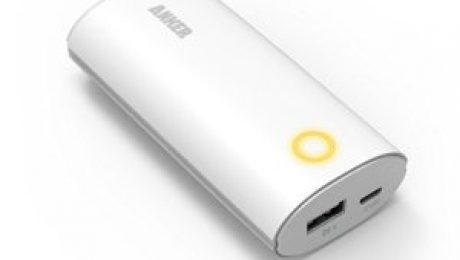
- Portable Battery Charger: At least one person on your gift list spends their day on the move, whether at work or play, and probably spends the back third of that day babying their mobile device’s dwindling battery while desperately looking for a convenient AC outlet. Give them one of these chargers for their daily carry and they can work or play into the wee hours of the next day without being tethered to a wall socket. They are small, light enough to carry in a jacket pocket and will quickly charge just about any USB powered device and then some.
- Brightly colored, extra-long Lightning charging cable: Everyone and their mother’s brother has an iSomething at home, and you can bet their one power cord is one tug away from an electrical disaster. Why not get them something that is hard to miss and long enough to use comfortably while being plugged into an inconvenient power source? If they have an older model iPad or iPhone with the older connector, this will work for them. Sadly, the color choices aren’t nearly as festive. If they hail from the Android side of the fence, these swanky cables will work for micro-USB devices, and these will work for the ones that come with the new-fangled Type-C connectors (the new Nexus phones, for example).
- Portable 4-port Wall Charger: The best holidays are spent with friends and family, and you can bet a full house will have its share of dying mobile devices looking for a charger. These handy devices are compact with a folding plug for easy storage and portage, and can provide a quick, safe charge for up to 4 devices and with minimal wall-wart eruptions.
- Chromecast TV: Small enough and cheap enough to put one on every HDMI TV in the house, and capable of playing content from both Android and iOS devices. Small warning, they will need Wi-Fi, and cat videos are even more awesome on a big screen in your living room. If you are more into music, they make an audio-only version as well.
- I call this the “Gadget Hound Night Stand Sanity Saver“: Some of us keep our phones and tablets on the night stand by our bed. Every single one of us has at least one charging cable dangling on or about our work space. This handy gadget provides charging for up to 4 USB devices, two AC outlets and a convenient stand that works perfectly for phones or small tablets, and is right at home by the bed or on your desk. Why not have one for every night stand in the house, so your family and guests can charge up right where their devices work and sleep?
- Waterproof Bluetooth Earbuds: While perhaps a little steep for a stocking-stuffer, these might be the perfect gift for that special, active person in your life. I personally find music, audio books and podcasts to be great motivators while engaged in labor-intensive but otherwise mindless endeavors (exercise, yard work, house work, etc), but I hate getting tangled in the cord running to my smartphone. Bluetooth headphones allow you to cut the cord without sacrificing quality audio, and they can double as a headset when the inevitable call comes in right while you are in the middle of your activities.

I really wanted this holiday season to be one of joy and goodwill towards all people, but it seems like the black hats will never rest. Let’s just get the ugliness out of the way: VTech – maker of tech toys for kids – has suffered a data breach that has exposed over five million customer accounts, and worse still, over six million child profiles. As per the usual, it seems that the Hong Kong company initially tried to downplay the breach by omitting any numbers or that kid’s profiles might be at risk, but eventually came clean as word began to spread. Even after announcing the number of people affected by this breach, VTech continued to spin the incident and tried to downplay the extent of data leaked, despite proof provided to the media that the data exposed included a year’s worth of chat logs and childrens’ profile pictures, which were uploaded to VTech’s Kid Connect service, a supposedly secure social media platform that parents can use to chat with their children through VTech’s tablets.
What this means for you:
It’s not clear yet when VTech (if ever) will take action and contact the affected families. Hopefully you will know whether or not you’ve purchased an internet-capable VTech toy for your child and set up the Kid Connect service. The information exposed in this hack has not been released to the internet, and the hacker behind the breach says that the info that was shared with the press to expose VTech’s poor security practices, but that’s not to say that it won’t eventually be released. As a parent, you should be mindful of any activity that involves exposing confidential information about your children on the internet (including Facebook!) and this will continue to be more important as more and more toys become increasingly sophisticated, connected and complex. According to VTech’s own admission, they were unaware of the security breach until the media contacted them for comment. As a business owner or manager, that is one nasty surprise you don’t want as a holiday gift. Make sure you have a good understanding of what confidential information you do store, and make sure it’s wrapped tight and kept safe, if it has to be kept at all.

When you sell as many computers as Dell does, all it takes is one small screw-up to create a security catastrophe. In this case, computers sold as far back as August of this year may have shipped with a compromised security certificate that could lead to a complete breach through a trivial exploitation of that certificate. So far, Dell has refused to disclose exactly which products are affected, but reports are confirming their Inspiron, XPS, Precision and Latitude lines are shipping with this problem. They are admitting that the problem exists, have published instructions on how to manually remove the compromised certificate, and will be releasing a software update to remove the certificate altogether. If you’ve purchased a Dell since Spring of this year, you should probably read on.
What this means for (some of) you:
In case the above didn’t contain enough technical jargon to convince you of how serious this is, let me unload on you: Dell shipped a slew of computers with a self-signed security certificate installed as a root trusted authority, and left the private encrpytion key on the devices. Even if you only understood part of that sentence, I’m betting you can intuit what publishing a private key does to the certificate. Yes, that’s right, it’s like sending everyone keys to your front door with your address printed on the key. Why this is a big deal is also fairly simple to explain. Because this key is essentially available for anyone to use, any reasonably proficient hacker could set up a fake hotspot at your local coffee shop, wait for a Dell computer to walk in, and then pretend to be Dell while unencrypting all of your network traffic. If that sounds bad, then you are picking up what I’m putting down. What do you do if you have an affected computer? Here are the instructions on manually removing the bad certificate, or wait for Dell to release a fix, which is schedule to arrive as of the time of this writing.
Full Disclosure: C2 Technology Partners, Inc. is a Dell Partner, meaning we sell Dell equipment and services, though after this particular goof, perhaps not as much as we had in the past.
Want to know more about security certificates? Here’s a reasonably straight-forward explanation of what they are and how they work.

It’s not exactly a walk in the park when a cash register gets infected, but when technology on the front lines of law enforcement is infected out of the box, we have an entirely new set of nightmares to keep us up at night. It’s bad enough that our military is using 14 year-old software to operate the most powerful naval fleet in the world, and now we have to worry about police officers trying to do an already tough job with infected body cameras. As of this writing, the manufacturer of the devices has yet to comment, but according to the security firm assisting law enforcement agencies with the implementation of these devices, the cameras are shipping with the Conficker worm, a virulent strain of malware that first appeared in 2008 and continues to exploit unpatched Windows machines to this day.
What this means for you:
The more savvier among you may have already posed the question, “How on earth does a simple flash memory-based camera get a virus infection?” The original success of the Conficker worm actually came from its ability to spread via USB devices through a well-known weakness in Windows operating systems: the short-lived “autorun on insert” functionality would execute a script on an infected thumb drive, infect the host computer with the Conficker virus, which would in turn search for any attached networks and other USB devices to infect. Police body cameras are designed to record data to built-in flash memory, and then have that data transferred via USB to a computer. See where this is going? Imagine your local, overworked Police Departments now being overrun by a 6 year-old virus. On top of this, it’s not a stretch to imagine savvy defense attorneys calling into question the integrity of video footage captured by compromised hardware. Though Confickers true purpose was never discovered, it infected millions of PCs. It’s not hard to imagine a new wave of malware infections brought on by untested and widely available devices like web cameras, USB chargers and many other devices that make up the rapidly growing “internet of things.”
Fortunately for the law enforcement agencies that purchased the equipment, their integrator was on their game and detected the infection before the cameras were put into the field. This only came about because the computers to which the cameras were attached were protected by up-to-date and reputable antimalware software. While it won’t be the magic bullet we all wish existed, solid antimalware protection will go a long way towards preventing disaster in your organization. Don’t skimp in this regard – it might put more at risk than you think.

According to the meteorologists (and just about every media outlet) we are in for a very wet Winter. Depending on where you live and work, this may just mean miserable traffic, or it might mean flooding, mudslides and worse. One thing we can always count on when it rains in Southern California is less reliable internet connectivity. On its best day SoCal is ill-prepared for any sort of weather other than the mild temperate climate we normally enjoy, and severe weather invariably impacts all of the major ISPs in the area. I can say without a doubt that while every single ISP labors unceasingly to improve the reliability and speed of their networks, but they all rely on physical infrastructure that is sometimes (oftentimes) outside of their direct control. Most of that is copper wire or optical fiber that is distributed through poles, buried cable lines, and subterranean tunnels, all of which are subject to the forces of nature. To top it all off, all of the internet traffic in the world passes through an absurdly small number of chokepoints, including one in Downtown LA that, last year, was taken out temporarily by a car crashing into the building lobby where it’s located. And it wasn’t even raining that day. Not convinced? Northern California experienced multiple widespread outages recently due to malicious parties physically cutting subterranean fiber lines that would seem to be too easy to access.
What this means for you:
Hopefully you have built a business sustainable enough to withstand an internet outage of an hour or two, but what if that outage were to last an entire day, or, even worse, multiple days? Most of my clients are savvy enough to know how to get work done from other locations, and many of them use cellular broadband on a regular basis, but what if your entire company had to figure out how to work from another location because the internet was down? Even worse, what if your building was flooded or rendered uninhabitable/unreachable because of the weather? While it would be impossible to provide a comprehensive guide on what to do in these types of situations, here is are a few questions that should help you start planning for that inevitable rainy day we will all face at some point:
- Who provides your internet service? Do you have their contact information handy some place other than your office?
- Who provides your phone service? Is it tied to your internet service? What happens to inbound calls when your phones are offline?
- Who hosts your email? Is it provided by a server in your office? What would happen if your customers/clients could not reach you via phone or email for any length of time?
- Do the primary operations of your business rely on the internet in some form or other? e.g. point of sale systems, call centers, web servers, etc. How much revenue might be lost if you were “offline” for a day? A week?
- Do you have a way of communicating with your co-workers or employees if the main office is “offline”? What about your vendors, clients and customers?
A sustainable and successful business must be able to operate in adverse conditions, and most importantly, not have the internet be a critical failure point. We are still a ways away from a highly reliable information superhighway, so make sure you have a rainy day plan ready.
Image courtesy of Stuart Miles at FreeDigitalPhotos.net

T-Mobile is set to announce a new device that will purportedly offer “full-bar” coverage for your home, even in areas that offer little or no tower-based cellular signal. The “4G LTE Cellspot” plugs into your home’s router and uses your internet connection to provide the cellular connection you may be lacking. To make this even more enticing, T-Mobile is offering this device free of charge ($25 deposit required) for all post-paid (as opposed to pre-paid) customers. Suspicious yet of this gift-horse? Good for you if you spotted the hitch.
Here comes the sucker punch:
The self-proclaimed “un-carrier” isn’t the first to offer this sort of device: ATT, Verizon and Sprint all have similar devices, with one glaring exception: you can’t limit who has access to the T-Mobile device plugged into your router and using your bandwidth. This might not be a problem for those blessed with larger homes or big yards, but the Cellspot is designed to boost signal for any T-Mobile device within 3000 square feet. The device works by routing cellular calls (and data) via your internet bandwidth, which may or may not be capped, depending on your provider. Translation: any T-Mobile device, yours or a complete stranger’s, will consume bandwidth on your dime. On top of this, any data bandwidth transmitted via this device still counts towards your bandwidth limit (if you have one), even though you aren’t technically using T-Mobile’s infrastructure to transmit that data. All of sudden, that device ain’t looking so “free” anymore, eh? All said, if you are among the unfortunate who suffer from poor cellular coverage in your home or office and rely heavily on your T-Mobile cellphone, and you have the fortune of having plentiful broadband coverage (with no bandwidth caps) this device might be the ticket to glorious full-bar coverage. Caveat emptor, and always beware carriers bearing “gifts”.

As if Volkswagen didn’t have enough to worry about with the emissions scandal, European security researchers have demonstrated a proof-of-concept exploit that can allow an attacker to covertly disable airbags (and other systems) in the German manufacturer’s autos. Unlike the more dramatic wireless hacking demonstration of Jeep vehicles that caused a massive recall, this particular exploit requires actual contact with the car, either via a compromised laptop or malicious USB device connected to the vehicle’s diagnostics port. To demonstrate the hair-raising potential of this exploit, the hackers were able completely disable the airbag, but have the onboard software continue to report the system as functioning properly. For now, the hackers limited their hacking to this proof-of-concept, but they believe that with further testing and research someone could develop malicious code capable of executing more serious system disruptions while the vehicle was in motion, and perhaps long after the infecting device was removed.
What this means for you:
We are rapidly approaching a future where most of the devices upon which we rely will have embedded computers. Here’s a short list of items that already appear in homes and have this capability right now:
- Thermostats
- Burglar alarms
- Surveillance systems
- Major appliances (refrigerators, ovens, washing machines)
- Door locks
- Lighting systems
- Televisions
- Electrical meters
- Gas meters
- Fire and life-safety systems
As the researchers of the Volkswagen were quick to point out, the problem wasn’t with Volkswagen’s engineering, but a weakness in a third-party diagnostic system, an easily compromised laptop – mechanic’s don’t have special devices, they use the same gear we use – and our willingness to plug things into our devices without specialized knowledge or assurances of security and safety. Many of the items listed above are easily accessible by visitors, repairmen and sometimes complete strangers, and even though the infecting agent may be completely unaware the device they are connecting to your devices is compromised, the damage is already done once it gets plugged in. Once again, the weakest link is the human, either us or some hapless mechanic. It’s important to be aware of all the systems with which you surround yourself, as well as who is servicing them, and whether they themselves are taking the necessary precautions to stay safe.

The launch of Google Glass, though initially celebrated by the hardcore nerd crowd, was generally greeted with derision, scorn and outright hostility in some cases. After a few short months of trying to generate buzz in a largely disinterested consumer market, Google packed up its toys and went back to the drawing board. At the time, the marketing campaign was somewhat tone-deaf to the general public’s growing privacy concerns and there really weren’t many practical applications that weren’t being done better and much less conspicuously on a smartphone or tablet. As of June this year, Google has refocused their efforts on wearable technology with a new team called Project Aura, and have been quietly shopping the next generation of Glass to tech-dependent industries like energy, manufacturing and healthcare.
Like a phoenix from the ashes!
One project that has caught some media attention is a clinical trial run by Stanford to test whether or not Google Glass could provide help to autistic children. Researchers have developed software that can identify basic human emotions when a Glass wearer looks at another person’s face, a social skill that is signficantly underdeveloped or absent in those affected by autism. One component of the program is a simple game in which the wearer is directed to find someone displaying a specific emotion, for example, someone who looks “happy,” and if the child “sees” someone who has a smile on their face, they receive points. The researchers hope that by gamifying the experience and reinforcing learning with instantaneous feedback, autistic children can develop skills that will assist them with interpersonal interactions. On top of this, the device can provide constant telemetric data about the wearer themselves, allowing researchers to gather detailed information on things like eye contact and whether or not the child is gradually becoming better at locating particular emotions.
After an early trial with 40 children in a lab environment, Stanford is launching the next phase of its clinical trial by expanding the run to 100 families in their own homes. The portable, connected nature of Google Glass seems particularly well suited for these types of applications, and you can bet we are only seeing the very beginnings of their potential applications in the medical field.

Adobe Flash can’t seem to catch a break. Their most current black eye has arrived in the form of yet another zero-day exploit of a vulnerability in the latest versions (19.0.0.185 and 19.0.0.207) of the browser plug-in. According to Trend Micro’s blog, the hacking group Pawn Storm is targeting government workers via spear-phishing emails that contain links to news about current events. Instead of taking them to a legitimate news story, the links lead to compromised websites that can install malware onto the victim’s computer via the aforementioned exploit. Rather than the usual identity theft, this group seems to have a more politicized agenda and bears similarities to attacks on NATO from last year.
What this means for you:
If you are new to this blog, you may not have been briefed on the #1 Rule of Personal Technology Security: “Don’t click strange email links.” Even clients who have weathered years of me saying this sometimes let their guard down, so Rule #2 is “Be prepared for the worst,” which you should interpret as (1) having a strong firewall, (2) trusted anti-malware installed, and (3) a contingency straegy that includes backups and plans for operating without core infrastructure when things do go wrong. The sad matter of fact is that cyberattacks will get past anyone’s mental guard – we are only human after all – at which point properly installed and configured technology can act as a safety net. Note the emphasis – poorly implemented security is worse than nothing at all in some cases. When you have nothing, at least you aren’t lulled into a false sense of security. And don’t count on the (perhaps prematurely reported) death of Flash as means to improve everyone’s overall security profile. We haven’t quite seen the end of Flash just yet, and there are plenty of other platforms (Java anyone?) that could easily take its place if and when Adobe finally puts this software out to pasture for good.http://arstechnica.com/security/2015/10/new-zero-day-exploit-hits-fully-patched-adobe-flash/

Three major companies and a popular crowdfunding website joined the illustrious ranks of the hacked last week. At the forefront of media attention was mobile service provider T-Mobile who had to explain to nearly 15 million of its customers that anyone who had their credit checked while in the process of applying for T-Mobile service would now be enjoying the “benefits” a near perfect (for identity thieves) exposure of their data, including name, date of birth, social security number, addresses, phone numbers and even government-issued ID numbers. Online brokerage Scottstrade suffered a breach exposing nearly 5 million customers over a year ago that they didn’t even know about until informed by authorities investigating the matter. Rounding out the list of big names is everyone’s favorite business bad-boy, Donald Trump and his Trump Hotels business, of which seven luxury hotels appeared to have suffered a year-long breach in security that allowed thieves to siphon off guest credit and debit card data. And if that wasn’t enough, data thieves also managed to penetrate Patreon, a website used primarily by independent artists and entrepreneurs for fundraising, and exposed over 2 million users emails, passwords as well as their specific site activity.
What this means for you:
By this point, if you haven’t at least racked up two years or more of “free” identity theft protection from the numerous data breaches, you have been living the life of a true luddite and should share the secrets of your success (just not online, right?). What I’ve found among many of my clients, friends and family is that most have just furrowed their brows, shaken a symbolic fist at the faceless enemy/internet/corporation and more or less accepted this as a new fact of life. Many of them haven’t even taken advantage of the credit protection services offered as compensation for being a victim of one or more data breaches. As I’ve mentioned in the past, most Americans are now suffering a near textbook-perfect example of bad news fatigue, primarily because it seems like nothing can be done. But there are things you can do:
- Have a look at Have I Been Pwned to see if any of your email addresses show up. If they do, you should change your passwords, especially if the account that was “pwned” was associated with a password you use elsewhere.
- Sign up for any identity/credit protection services offered to you if they are still available. While they may not be able to prevent an attempt to use your identity, you are much more likely to catch it happening, and these companies can help recover from damage caused by the theft.
- Most critical online services such as banking and email offer two-factor authentication which can provide a much higher degree of security. Even though a hacker may have a password for your account, they won’t be able to access accounts protected by two-factor authentication.
- Understand what data you or your company is responsible for, and if you use vendors to process any of that data, make sure they are exercising proper diligence in securing their perimeter and your data. In the case of T-Mobile’s breach, credit-check vendor Experian was the source of the breach that will likely result in significant financial and reputation distress.