


_0-460x260_c.png "Google_Chrome_icon_(2011).png")
Back when Google’s Chrome browser was brand new in the browser market and demonstrating how poor Microsoft’s Internet Explorer security was in comparison, it was easy to recommend it as the faster, more secure option. However, with market share comes concessions to convenience and feature-creep, and it seems that Google may be stretching itself too thin to be the browser on everything and for everyone. Aside from the rather disturbing and glaring security flaw pointed out earlier this year in the desktop versions of Chrome (and steadfastly refuted by Google…until it was fixed), Chrome has typically been viewed as the “most secure” of the big three Windows browsers (the other two being IE and Firefox).
Unfortunately, security firm Identity Finder has burst this bubble by revealing another weakness in Chrome. In the spirit of convenience, Chrome offers to save information used to fill out the countless webforms we all run into on a daily or even hourly basis while surfing. Most of these fields are what would be considered personally identifying information (names, addresses, account numbers, etc.) and Chrome stores them in plain text on your hard drive so as to be able to retrieve them for autopopulating other web forms. The problem with this, of course, is that anyone with access to your hard drive can read that data and use it to nefarious ends. And in case you’re still trying to sort out why this is bad, access isn’t limited to someone working on your computer or stealing your hard drive. Unauthorized access is most often gained now through malware infections.
What this means for you:
Sadly, achieving better security is no longer simply a matter of changing your browser, no matter how much any company (even Google!) would have you believe otherwise. If you want to disable the above mentioned “feature” in Chrome, you can do so by visiting Settings -> Advanced Settings -> Passwords and Forms and unchecking “Enable Autofill to fill out web forms in a single click.” You should never rely on just a browser choice to determine the totality of your security. Good security is a combination of browser choice, settings, malware protection and constant vigilance. Chrome still remains a solid choice as a browser but beware convenience features like Autofill and saving passwords in your browser, as this convenience may come at the price of security.

Once again, Google is blazing a new technology path, not necessarily by innovating, but by having the size and influence to make change happen in an industry that seems at times to get stuck in a vicious circle. In this particular case, technology has been navel-gazing on the password issue for years despite having the solution in hand decades ago: multi-factor authentication. In its most simplistic and well known form, you have probably been using two-factor MFA for years without even realizing it: your ATM card and PIN. In MFA terms, this is “something you have” (your ATM card) and “something you know” (your PIN). Without both present, authentication doesn’t happen.
Using its thousands of employees as guinea pigs since early 2013, Google is testing a technology platform it plans on releasing in 2014 based on MFA. The “something you have” in this case is a small USB FOB that is paired with your user login and a simple 4-digit PIN (“things that you know”) that authenticates you on a computer or an NFC-capable mobile device. If this sounds familiar, it may be because this device I wrote about previously does essentially the same thing. Instead of having to remember a bunch of different passwords, whenever you needed to prove who you are on the web or in an app, you could plug in your Yubikey (or tap your Nymi!) and viola, “Identity Verified!”
What this means for you:
The Yubikey Neo isn’t available yet, and Google hasn’t given a firm date as to when it will be available other than “2014”. Also, the utility of the device is highly dependent on a wide variety of services adopting the authentication platform, so even if they made it available as early as next month, you may find it to be somewhat useless until your favorite providers implement the technology, if they do at all. If you want to show your support for the death of the password, you may want to jump on the Nymi bandwagon, as even if the product never gets widely adopted, you can still accessorize with a wearable conversation-piece!

Earlier this year, CEO Thorsten Heins of beleaguered tech company BlackBerry infamously stated, “In five years I don’t think there’ll be a reason to have a tablet anymore.” The press had a field day with this quote and the explosive growth of tablets in 2013 alone seems to be proving otherwise. As if to rub Mr. Heins’ and other tablet-doomsayer’s faces in it, October is seeing the launch of multiple new tablets, including new lineups from Microsoft, Nokia and Apple, all essentially debuting on the same day.
Apple dominated the American media on Oct 22 with the debut of “the lightest full-sized tablet” on the market, the iPad Air, weighing in at a diminutive single pound. It also updated the wildly popular iPad Mini with its high-resolution “Retina” display, bringing the 7″ tablet up to par with competing models from Google and Amazon. In an attempt to not be out-done (and sadly not quite succeeding in that effort), Nokia announced its first tablet today as well. The Lumia 2520 will run Microsoft’s Windows RT, a move that analysts questioned given the tepid consumer response to Microsoft’s tablet OS, but is not unexpected in light of the Redmond tech-giant’s recent acquisition of Nokia’s hardware business. Not wanting to be left out of the tablet party, Microsoft held its own midnight release event on Oct 21 at its retail stores around the country to celebrate the arrival of the Surface 2. Despite loud music, flashy displays and enthusiastic staff, the Surface 2 launch parties seemed to be (unsurprisingly) sparsely attended.
What this means for you:
If you’ve been holding off on buying a tablet for some reason, the market is currently overflowing with choices, and many of them are very strong on features and backed by staunch developer support and healthy ecosystems, notably the iOS and Android family of products. Though many are saying it’s too early to tell, the Windows RT and Windows 8 tablets have a stiff, uphill climb in the market, something that is keeping developers away from the OS, leaving Microsoft’s app marketplace relatively barren compared to the competition. There’s been a minor stir of interest in the Surface tablets from the arts industry, primarily because of the hardware’s robust pressure sensitivity, but unless you have a specific use case in mind, I’d steer clear of the Windows tablets for now. If you’ve been concerned about the size and weight of the 10″ tablets (very hard to use as bedtime readers or if you spend any time as a standing commuter) you can’t go wrong with a 7″ tablet from either Apple, Google or Amazon, all of which now feature high-definition screens, robust app stores and great portability.

Only seven months after a major redesign that many considered a huge flop, Yahoo has unveiled major changes to its Ymail service, and it has its users up in arms again. The new features like conversation threads, themed background images and a massive terabyte of storage are clearly following in Gmail’s footsteps, changes that weren’t unexpected, given that Yahoo’s CEO, Marissa Meyer was one of the core designers of Gmail when she was at Google.
What this means for you:
Yahoo Mail is the second largest webmail service in the world, and very close on the heels of Gmail. Feature changes like the ones above are attempting to build on Google’s successes, but as many customers have noted in the large volume of complaints, the main reason they use Yahoo Mail is because it is not Gmail. The biggest change seems to be the removal of the Mail Tabs feature, something that nearly 40K users have voted to have Yahoo reinstate. Users are also complaining about numerous bugs that appear to have never been quashed from the last time Yahoo messed with its email service. Seemingly heedless to the outpouring of complaints, Yahoo has issued press statements reiterating the need for the company to progress the development of its services into a “…more modern and personalized Yahoo!” Perhaps that development means some loyal fans will be left behind.


It must be another day ending in “Y” as hackers are making headlines again: Airplanes, cell-phone chargers and now your car might be the target of hackers. As you might have already guessed, auto manufacturers have been building computers and networks into cars for years now, and modern models can have as many as 70 different computerized systems that control every aspect of the car: braking, steering, acceleration, etc. Where there’s a computer, hackers are sure to follow, and security experts have successfully demonstrated hacks on late model cars that can take over just about any aspect of computerized systems including slamming on the brakes full the car is at full speed, jerking the steering wheel and shutting down the engine completely.
What this means for you:
Before you drive your shiny new ride over to the nearest Cars for Causes office and pack the family off to that bunker in Montana, you should know that the hackers in question worked for months to crack the auto systems on a specific model of car, and in most cases the hacks required physical access to the vehicle. However, according to past reports, ethical hackers from UCSD have managed to compromise at least one late-model GM vehicle via wireless methods, and it’s hard not to imagine that as automobiles become even more complex and automated (Google’s self-driving car, anyone?) as well as wirelessly connected to the internet, the unethical hackers won’t be far behind in tarnishing what otherwise might be a bright, self-driving future.
Image courtesy of Sura Nualpradid / FreeDigitalPhotos.net

Confirming what many commercial security companies already claim, a security bulletin published on the Public Intelligence website by the Department of Homeland Security and the Federal Bureau of Investigation identifies the Android OS as the most attacked mobile operating system. Nearly 80% of all malware threats in 2012 targeting mobile devices were focused on Google’s platform. The distant second place (19%) was held by Nokia’s Symbian OS, most commonly found on older feature phones. At the other end of the spectrum was Apple’s iOS, which despite being one of the most popular mobile devices on the planet, was only targeted less than 1% of the time in 2012.
What this means for you:
The malware focus on Android is not unexpected: the platform is fractured across multiple versions and multiple carriers, and there are hundreds of thousands of phones running older versions of Android that have well-documented security flaws that have been fixed in later versions. Unlike Apple’s relentless updating of the iOS, many Android phones rely on the carrier to push OS updates, which they do reluctantly, if at all, especially to hardware lines that are no longer being sold or considered a significant portion of the market.
Unfortunately, the carriers have also locked down the OS on many models, requiring a series of highly-technical processes to “unlock” and “root” the phone to force an update to the OS. Of course, doing so voids any warranties with the carrier, and has a chance of “bricking” the phone itself if the process is done incorrectly, or if it is updated with an OS that has bugs or is incompatible with that specific model phone.
Here are some things you can do if you find you are using an Android phone running an older version of the OS:
- Contact your carrier to request an OS update. If they tell you one is not forthcoming immediately, or that your particular model is essentially no longer receiving updates, let them know you are concerned about security flaws in the older OS, and ask for an upgrade to recent model phone.
- Whether or not a new Android phone is in your future, you should be extremely careful about “sideloading” apps. Only install apps from Google’s Play store, and be very careful following app install links from anyone. Instead, get the name of the app you want to install, go to the Google Play app already installed on your phone, search and install from there. If you can’t find the app, it’s likely the link was to a sideloading site (and potentially unsafe), or a disguised attempt to get you to install malware on your device.
- Install a malware protection app. Several reputable companies make apps for Android. I’ve been using SecureAnywhere from Webroot for several months now, without issue, and I will soon be testing Kaspersky’s app. Look for a name you recognize, and give their app a try. Some of them might slow your phone down on ocassion as they scan for issues, but the temporary inconvenience may save you from serious heartache later on.
-460x260_c.png "Google_Chrome_icon_(2011).png")
It pains me to criticize a browser that I typically praise and recommend, but I can’t play favorites when it comes to security. An article by Elliott Kember pointed out a glaring security controversy within Chrome that has the various tech ideology camps (hackers, security analysts, developers, power-users etc.) bickering over some of the most basic elements of data security. In a nutshell, Chrome (like all browsers) has the ability to save passwords for any website you visit, and when this feature is enabled (it is, by default) it will ask you politely if you’d like to save that password you just entered for this website. Here’s the controversy: if you go into Chrome’s advanced settings and view the list of passwords saved by the browser, you can actually click on each password and view it in clear text. Not the usual black bullets we’re used to seeing – you can actually read the password. Go ahead, see for yourself. I’ll wait.
I was literally gobsmacked when I found this out, as I have been using Chrome ever since it was released to the public. “They obviously haven’t thought this out!” I said to myself, but it seems that the head of Chrome’s security development thinks otherwise (warning: geeks arguing on the internet – the knives are out!); the basis of his argument is that if someone other than you is physically sitting at your computer and can manipulate the mouse and keyboard to the point where they can get to this screen, then any security precautions Chrome could put in place are essentially null. This is actually a position I share regularly with my clients: if someone has physical control of your device, most security measures like passwords will do much less to protect you than you think. HOWEVER…
What this means for you:
Yes, if someone unsavory has possession of your hardware and are appropriately trained/equipped, even a strong password isn’t going to keep them at bay for long. But what about the time your roomate or co-worker asks to borrow your laptop real quick to do [random, innocuous websurfing task]. Sure, no problem, you close out of whatever sensitive websites you might have open and push it over to him. Let’s say this person’s intentions aren’t completely honorable, but he also knows he doesn’t have much time to go browsing around randomly through your bookmarks or history to see if any website sessions are still valid (ie. you’ve recently entered a password, and a cookie provides convenient re-opening of a website). But he does know that Chrome has this particular flaw, and he quickly glances through the saved password list, memorizing a couple critical ones to use for later wreaking of havoc.
Scared now? It’s not clear whether Chrome will ever fix this “issue” when they don’t recognize it as such. I rarely let anyone else use my laptop or desktop, but I’m still erasing all my saved passwords and disabling this feature. As convenient as it may seem, at minimum you should NEVER save passwords for any sensitive accounts like online banking, email, etc, and if you can stand the inconvenience, don’t let your browser save passwords at all, in any browser on any platform.
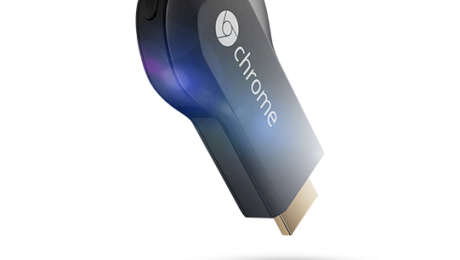
Unlike the hype build-up surrounding Glass which seemed to go on for months, Google stole a march on the media and surprised the world last week with a $35 device called Chromecast which is poised to rock the world of Television. This little gadget is designed to work with any HDMI-capable television or monitor and will stream specific provider content straight to your entertainment center big screen.
Which content providers? How about streaming heavy Netflix and, of course, all of Google’s content offerings, such as YouTube and Google Play music and video. Despite the “limited” content partners named at launch, Chromecast sold out online within hours of the announcement, and retail establishments like BestBuy were cleared out shortly thereafter. As expected, other content providers are jumping into what has the makings of a bona fide internet gold-rush, with both Vimeo and Netflix competitor RedBox announcing apps for the device. Hackers have also uncovered what appears to be hooks for HBO’s Go service, the arrival of which would truly cement Chromecast’s position in the entertainment ecosphere.
What this means for you:
If you are one of the hundreds of thousands of families that has an HDMI TV in your living room and wished there was a way you could watch Netflix streaming videos on it, this is your device. Netflix-capable devices have existed for years: all current gaming consoles (Wii, Playstation 3, Xbox 360) and other set-top devices like Apple TV, Google TV, Roku and Boxee, have this capability, but prices start at $100 and head North quickly.
The savvy among you know that you can easily hook a computer, laptop or tablet up to any modern television, either through a set of cables, or in Apple’s case, a not insignificant investment in Apple hardware. With the exception of the Apple solution, these solutions are encumbered by wires that essentially tether that device to your entertainment center more or less permanently, and Apple’s solution locks you into their tightly-controlled iTunes environment and a handful of Apple-approved apps.
Now, for the cost of an mid-quality HDMI cable, you can stream that same content (and who knows what else will arrive soon?) to any HDMI TV. Want to enjoy Game of Thrones at a friend’s house, but they don’t have HBO? Assuming the HBO Go app becomes a reality, you’ll be able to put the Chromecast device in your pocket, head over to your friend’s house and plug it in to their TV. Log into your HBO Go account from one of their computers or connect your smartphone to their WiFi, and you are good to go.
Google’s New Advertising Shill: You!
MetaFilter user Andrew Lewis coined a phrase that has become the rallying cry for internet privacy watchdogs over the past 3 years, “If you are not paying for it, you’re not the customer; you’re the product being sold.” He was speaking of Digg’s redesign in 2010 in which the emphasis of the site shifted away from user-centric content curation and towards a model that was clearly intended to monetize Digg’s large userbase. Since then, the phrase has been applied to many services, including the 800-lb gorilla of free internet services, Facebook, and dozens of other social media sites that use advertising money to fund their “free” services. Savvy users will note that Google has been leveraging this model on a less obvious (but no less profitable) basis ever since Google search arrived and Gmail extended its tendrils into millions of users’ daily online existence.
The subtlety was cast aside boldly last week when Google announced a change to its privacy policy that granted itself the right to utilize its users’ likeness and content authored on any one of its many properties to advertise to other users. This includes content and reviews written by users on G+, YouTube, Zagat, and the Google Play store. The new policy is the default, and users must opt out if they prefer to not participate in this endorsement model. Clearly, Google is hoping to entice advertisers with the very real impact of recommendations made to users by people they know. But many are angered by this change, and the internet outrage is spreading.
What this means for you:
If you have a Google account, then you are automatically opted in to this advertising model. To opt out, you must go to your Account settings under the Google+ section, and look for the “Shared Endorsements” link to disable your participation in the program. If you actually go do this, you’ll note that Google has written quite the argument as to why you might want to stay opted-in: “Your friends might not be able to benefit from your wisdom.” Depending on your level of participation in online reviewing/commenting/rating, participating in this program may be no big deal, or a very big deal. Either way, you should consider the implications for your online brand, whether current or planned, and the impact on your privacy, especially if your face and words could start appearing on thousands of monitors around the world.