



It’s an unfortunate but not unexpected state of affairs that hackers continue to take advantage of our voracious appetite for news. As has been happening with hot news stories for at least a year or more, malware links are cropping up to exploit the media frenzy surrounding missing Malaysian Flight MH370. Taking advantage of the viral nature of sharing prevalent on Facebook and Twitter, fake links promise “shocking video” revealing the fate of the missing flight. Clicking them takes you to a counterfeit survey designed to look like the Facebook surveys many app-makers use to gather info on users before granting access to their app or content. Instead of course, you are giving your info to hackers on a fake website which will undoubtedly be used to annoying, or worse, nefarious ends.
What this means for you:
If I’ve said it once, I’ve said it 1000 times: don’t click links in Twitter, Facebook or email, doubly so if the source isn’t someone you trust or recognize, and you can’t clearly see the destination URL. Most links shared on Twitter use a URL shortener which obscures the final destination, a technology designed originally to compress long URLs into tiny ones and now used as a trick by spammers and hackers to lure you to a fake website. All it takes is a simple page load (no typing or filling in forms required) for an out-of-date browser or OS to be compromised, and once they have a toe in the door, it’s all down hill from there.
From this point forward, you should expect hackers will exploit hot news items to take advantage of our natural curiousity. If part of your online brand-building, either professionally or personally, includes re-sharing or retweeting internet links, be careful you don’t inadvertently share a fake news item to your friends and followers.
Image courtesy of Stuart Miles / FreeDigitalPhotos.net
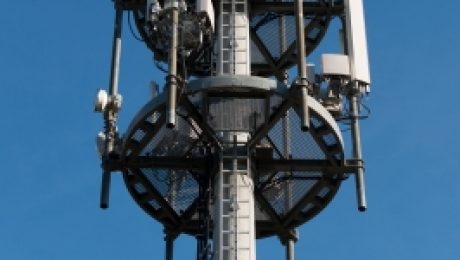
If telecommunications startup Artemis has anything to say about it, bulky and costly cell towers like the one pictured here will be a thing of the past. Instead, they are hoping the nation’s cellular providers will buy into their new technology platform, dubbed “pCell” that they believe will revolutionize both network coverage and data speeds. Artemis engineers have designed a small (about the size of a home office router) device that they believe can be cheaply and easily deployed throughout any geography to provide a much more thorough coverage area and up to 1000 times the speed of 4G networks, a technology that carriers are still struggling to deliver to most parts of the country.
What this means for you:
The cell towers in use by cell carriers today are designed to provide large “cells” of service that are shared by all mobile users within the umbrella of coverage provided by the tower. The vagaries and frustrations known to all cell phone users are physically caused by our movement in, out and away from those cells, and how heavily each cell is being used at the time. Conversely, pCells are designed to provide coverage in a form of mesh network, and can use overlapping signals from nearby pCells to amplify the service delivered to each cell phone. On top of this mesh approach is an underlying shift in the network technology: with this new platform, each cell phone is granted its own “cell” of data services rather than having to share one large cell provided by a central tower. According to Artemis, this will result in much greater efficiencies in data transmissions, improving voice and video quality and speeding up our uploads and downloads.
Artemis is preparing to launch the technology in the fourth quarter of this year. If the technology lives up to the hype, it could finally help deliver on the promise that smartphones first offered to us years ago, but stumbled on delivering mainly because of slow network speeds and spotty mobile network coverage. We can only hope that the carriers see that by providing faster speeds and better coverage they are investing wisely in their own sustainability, and we can move one step closer to a ubiquitous and instantaneous data network literally at our fingertips.
Image courtesy of franky242 / FreeDigitalPhotos.net

About a year ago, I shared an article from Ars Technica detailing a chilling and degrading hacker activity called “ratting” wherein your computer could be hacked into covertly spying on you. This disturbing trend now appears to be spreading to Android smart phones; for a short while before it was detected and removed, a seemingly legitimate app was available on the Google Play store that was purportedly for parents to keep an eye on what their children were doing on their smart phones. Unfortunately for the 50 or so people who actually downloaded the program, the real purpose of the app was to install a remote access trojan platform on the device which would enable someone to illicitly use the phones cameras and mics to spy on the user, as well as control other aspects of the phone like sending texts, making calls and sending emails.
What this means for you:
The app was built on a software development platform that is being marketed specifically to hackers, and one of the key selling points is this kit’s ability to build apps that can “hide” from Google’s security scans that usually prevent malware from being uploaded to the Play store. Translation: you can expect more apps like the one mentioned above to appear on the Google Play store. Where before you could, with maybe 99% effectiveness, depend on Google to protect you from harmful apps, you can no longer take for granted that if an app appears on the Google Play store that it is 100% legitimate. To protect yourself as an Android user, you should:
- Make sure to have a reputable Anti-malware app installed (I like Webroot’s Security & Antivirus).
- Read carefully the access permissions each app is asking for before installing.
- Pay attention to user reviews and install count. If the app only has a small number of reviews and installs, give it a few days and check back to see the app survives internet scrutiny.
Fortunately, Google has a means to automatically reach out to any Android phone and purge apps that it has found to be harmful, but it’s much safer and less stressful to avoid being victimized in the first place.

Illinois-based security firm Team Cymru has released research findings that point to a wide-spread compromise of consumer-grade routers that are commonly installed in homes and small offices all over the world. As many as 300K of these devices from a variety of manufacturers have been hacked to redirect network traffic to counterfeit banking sites and possibly other malware-laden destinations. Though the hacked devices have been found all over the world, the highest concentration seems to be in Southeast Asia and Europe, with Vietnam, Italy, India and Thailand being hit the hardest.
What this means for you:
Hacked routers are not as easy to detect as a malware infection on a computer, primarily because most people never touch their home or small office routers except to install them or to reset them when their internet doesn’t work. In most cases, they might not even know how to access the router, and have long-forgotten the password used to configure and secure the device originally, if that install wasn’t completely handled by their internet service provider. In the hack mentioned above, all the affected devices shared a common trait of having their DNS altered to point to 2 specific IP addresses(5.45.75.11 and 5.45.76.36), allowing the hackers to effectively control where the compromised router sends any and all network traffic routing through that device.
Team Cymru recommends several ways to harden SOHO-class routers against the hacks used in the attacks mentioned above, but the methods require a familiarity with configuring network devices that is not usually found where these devices are installed. In order to make sure your router is secure, you’ll need to know the following:
- Who owns the router (you or the ISP)?
- If it’s owned by the ISP, are they managing it for you?
- If you own it, do you know the login and password for the device?
- Is your connection DHCP or static IP? (Most are the former as statics are an addtional charge)
- If it’s static, make sure you have the IP information documented.
- If you have access to the configuration of the router, is remote management enabled? If so, does it need to be?
- Has your router been updated to the latest firmware? If managed by someone else, will they handle the update?
Not sure how to go about filling in these blanks? Reach out to someone you trust (maybe C2?) with some basic networking and router configuration expertise and have them look at your SOHO router. Your router is a critical device in your home and office network and if it were hacked, every device (and person) connected to it could be severely compromised.

Security firm Hold Security LLC is reporting that a cache of 360 million account credentials are up for sale on the black market. Of the 360 million identities, 105 million of them may be from a single data breach, the size of which rivals Adobe’s breach (153 million) from October 2013. Also on sale are 1.25 billion email addresses, a veritable treasure trove for spammers. In this particular case, the account credentials up for sale seem to be mostly comprised of account logins and unencrypted passwords, an important distinction as any buyer can immediately start using the data versus spending time unencrypting passwords.
What this means for you:
Given the sheer volume of account credentials compromised it’s highly likely one or more accounts you use is somewhere on that list, as well as the passwords associated with those accounts. According to Hold Security, they believe the organizations from whom this data was stolen are still unaware of the breach, so it’s even more likely you will be the last to know if you have been compromised. Rather than waiting around, I recommend changing your passwords on all your important online accounts to much stronger, randomized ones, such as can be created and managed by programs like internet-based LastPass or Passpack (my personal choice), or if you prefer to keep your passwords closer to home, desktop programs like Roboform or 1Password.
Image courtesy of Creativedoxfoto / FreeDigitalPhotos.net

It’s a common practice in the technology industry to describe computer viruses and the way they behave using the same terms and concepts as the medical industry, primarily because the reality of how digital viruses work is rather boring and technical. Up until now.
In the “surprising no one” category of research findings, scientist in the UK have built a prototype computer virus called “Chameleon” that spreads via Wi-fi access points, and upon testing it discovered that it exhibited similar characteristics to airborne pathogens, ie. it spread more quickly in densely populated environments. The virus was also designed to keep its actions from interfering with normal device operations and to bypass well-protected devices for easy-to-infect models with weaker security, much in the same way biological viruses operate. It’s not clear whether the virus was designed to behave this way because the scientists knew how effective biological viruses worked and incorporated that into the design, or whether these traits manifested spontaneously from a “traditionally” designed computer virus.
What this means for you:
Don’t panic yet. The “Chameleon” virus was designed and tested in a lab by trained professionals, and never actually unleashed into “the wild”. Oh wait, did that sound like the premise of just about every virus outbreak movie in the history of Hollywood? Seriously, wi-fi viruses have not yet been found in the wild (but they are really close – see last week’s warning about Linksys routers), but you can bet that black-hat forces are hard at work trying to figure out how to attack wi-fi access points, and the first ones to be targeted will be devices used in heavily trafficked venues like airports, restaurants, coffee-shops and malls. Unless you happened to be in the business of designing wi-fi devices, there’s really not much you can do at this point beyond the usual mantra: keep your software and anti-malware up to date, avoid accessing sensitive data on public wi-fi access points, and use strong passwords. Stay vigilant!

Usually Apple is able to sit on the sidelines of today’s technology security circus , enjoying a (debatable) reputation for being more secure than Windows and even Android. Unfortunately, it had to step into center stage this week and own up to a security flaw in its core networking code used in both iOS and OS X. And not just a little one either: this one affects how SSL-encrypted network traffic is handled, and it affects iPhones, iPads running iOS 6 or 7, and any computer running OS X 10.9 “Mavericks”.
What this means for you:
In a nutshell, the bug essentially prevents the affected device from verifying the identity of the certificate used to guarantee the SSL encryption. When your Apple device fires up a secure connection using SSL, the first thing it’s suppose to do is check the SSL certification of the destination by verifying it’s identity. Except, in the case of the bug, it doesn’t but reports back to the device that everything is OK. This would be the equivalent of putting a blind doorman in front of your bar to check ID’s. Apple has released a patch for iOS 6 and 7, but still has not issued a fix for the OS X platform.
For now, until you verify you’ve patched your mobile device with the latest security update for your version of iOS, I recommend against using any applications that transmit confidential data (your’s or your client’s) over the internet. On the desktop/laptop side, avoid using Safari until OS X is patched, and switch to a browser like Chrome or Firefox, both of which implement their own SSL code that is not affected by this flaw. To keep track of whether or not Apple has fixed this hole, you can visit: http://hasgotofailbeenfixedyet.com/
Update: As of Feb 25, Apple has issued a patch for OS X 10.9. Make sure your Apple devices update to the latest version of their corresponding operating system.

It’s getting so that it might be easier to publish a list of companies that haven’t been hacked. Sadly, this week it’s dot-com darling Kickstarter and Wall Street stalwart Forbes.com, both of whom were hacked and user data exposed. Where Forbes almost immediately acknowledged that it had been hacked (unavoidable as the infamous Syrian Electronic Army announced that it was behind the attack), Kickstarter got on the wrong side of some folks for delaying it’s own announcement that it had been breached earlier in the week. Waiting almost 5 days before sending out an email to its users was viewed by many pundits as everything from lacksadaisical to outright criminal. In both cases, user names, email addresses and passwords were stolen, though both companies state that the passwords were encrypted which would make it difficult, but not impossible for hackers to crack weaker passwords in the stolen data.
What this means for you:
If you had accounts on either of these websites using passwords that you use elsewhere, you need to go out and change that password everywhere else it was used – preferably with a unique one for each website. I had accounts on both of these websites, but I’m less worried as both were unique to the websites and will never be used again. Until the technology industry can come up with a better way than passwords to secure our safety, your next best bet is to generate unique passwords everytime one is needed. Utilities like LastPass, Passpack and 1Password are invaluable for this sort of practice and are worth their weight in gold.
It’s also worth noting that in the case of the Forbes hack, their security was compromised by a targeted phishing attack. By responding to fake emails, duped employees revealed passwords that gave the attackers access to the WordPress engine that powers the Forbes.com website. Kickstarter has yet to reveal the nature of their security breach, but I wouldn’t be surprised if a similar phishing attack cracked their security. Phishing emails are becoming increasingly harder to spot as cybercriminals pour more effort and money into crafting effective attacks. The only protection is to be suspicious of everything, and to never click links in emails before independently verifying where they actually lead.

Several models of popular Linksys-brand routers may impacted by a self-replicating worm that can exploit a security flaw in the router’s programming. The exploit allows attackers to install a worm in the firmware which can lead to further security breaches on any device connected to that router’s network. According to Linksys, this exploit requires that the routers have the “Remote Management” feature enabled on the device, a setting that is disabled by default on Linksys routers. Depending on who set up your router, this setting may have been enabled expressly for remote management purposes, and as such your device is vulnerable to the worm, dubbed “TheMoon”.
What this means for you:
Linksys routers are a popular choice for home and small businesses. Unless you know for certain your router is not a Linksys device, I would put an eyeball on your router and check the make and model against the list below. Your network router is a critical point in your network’s overall security, and a compromised router can lead to a variety of problems and significant invasions of your privacy and safety. Even if your Linksys model is not named below, it’s important to check whether or not “Remote Management” is enabled on your device.
As of now, the following model routers are affected: E4200, E3200, E3000, E2500, E2100L, E2000, E1550, E1500, E1200, E1000, E900, E300, WAG320N, WAP300N, WAP610N, WES610N, WET610N, WRT610N, WRT600N, WRT400N, WRT320N, WRT160N and WRT150N. Linksys hasn’t confirmed whether this list will grow, as it does not want to reveal other models and make them targets for attacks. Until Linksys can patch the loopholes and issue firmware updates the only workaround is to disable the Remote Management feature, install the latest version of the firmware available, and reboot the router to clear any possible worms.

The first Tuesday of every month is commonly known as “Patch Tuesday” in the IT industry, and is called thus because Microsoft issues its monthly batch of patches and security fixes to its operating systems and applications, most notably Internet Explorer. February’s selection features a whopping 31 CVEs (common vulnerabilities and exposures) that have been fixed in 4 “critical” updates and 3 “important” updates. Chief among the fixes are patches to all versions of Internet Explorer 6 through 11 to fill holes in the web browser that Microsoft anticipates being exploited in the next 30 days. Adobe also issued a fix for its Shockwave Media Player (a legacy multimedia player that may be installed on older PCs), not to be confused with Adobe Flash, which was also patched last week to combat a security hole that was actively being exploited on the internet.
What this means for you:
Depending on whether your technology is managed by an IT department, 3rd-part provider like C2, or just by you, your Windows computers may update in the next day or two, or further out if your IT department tests MS updates before patching your company’s fleet. The ones that really need to pay attention are those that manage the software updates personally, as it’s easy to forget about or ignore the Windows Update process.
Not sure if your computer’s OS needs an update? Go to Control Panels -> Windows Update and read the information presented there. It will tell you if there are any updates waiting to be applied, when your computer was last updated, and you can even see a full history of what was updated previously. You can also double-check to see how your computer is set to check and apply updates. The best choice for most non-managed computers is the default setting for Windows Update, which is to download and apply all “important” and “critical” updates automatically on a regular schedule.
If you need to check whether Adobe Flash is properly patched, you can visit http://helpx.adobe.com/flash-player.html to check what version you have installed and whether it is working properly.