


Microsoft has announced that it will be raising the price of Windows 8 upgrades at the end of January to the full retail cost of $119 to $199 for the Pro version. The downloadable upgrade from Windows 7 to 8 is currently available for $39.99, and there is a boxed, retail version available for $69.99, but those prices will no longer be available on February 1.
What this means for you:
If you were at all considering upgrading to Windows 8, but aren’t necessarily ready to make the change right now, you may want to go ahead and make the purchase now and save yourself some money. Savvy technology users will have only minor issues transitioning, and Microsoft isn’t going to change their minds and rollback Windows 8, so eventually, savvy or not, you’ll probably be using Windows 8 at some point.
Keep in mind that the $39.99 price is for an upgrade version of Windows 8, so you will need a machine with a licensed copy of Windows XP, Vista or 7 to use it properly. The upgrade version cannot be easily installed on a blank computer unless you have the install media (and activation key) for your older OS handy.
According to security firm Exodus, the patch to Internet Explorer 6, 7 and 8 released on December 31 only fixed one of several ways to exploit a weakness in Microsoft’s browser. In their research on this exploit, Exodus continued to develop more aggressive ways to exploit the documented weakness and in doing so, uncovered a means that bypasses Microsoft’s fix, but are witholding details from the public until Microsoft has a chance to address their findings. A number of human rights and government sites have been compromised with malware agents that exploit this weakness and appears to be part of a larger campaign by the “Elderwood Gang” – a highly effective and well-backed group of hackers that have been targeting high-profile government sites since 2009, ostensibly with financial and espionage-based goals.
What this means for you:
Internet Explorer 6, 7 and 8 are still considered vulnerable, though no one has documented any websites yet taking advantage of the exploits discovered by Exodus. The fact that there are still holes in IE browser security will not go unnoticed, and if Exodus can develop work-arounds for Microsoft’s patch, you can bet groups like “Elderwood” will be able to do the same, if they haven’t already. Your best short-term solution is to either use another browser like Chrome or Firefox until Microsoft can fully patch this weakness, or upgrade your Internet Explorer to version 9 or 10 as soon as possible. If you are working for an organization or using software that requires backward compatibility to IE 7 or 8, you should consider having a serious discussion with the IT department about their reasons for maintaining what is increasingly becoming an untenable stance. If you are required to use IE 6 for some unfathomable reason, you should stop what you are doing immediately and consult with an IT professional, as IE 6 is a magnet for security exploits.

It might be the last day of 2012, but there’s still time to issue yet another patch to fix a zero-day exploit in Microsoft Internet Explorer 6, 7 and 8. Confirmed on Saturday by Microsoft, this patch fixes a vulnerability in all versions of IE prior to v9 that may allow hackers to gain control over a victim’s machine. This latest weakness is likely to be exploited when a computer using one of the versions of the aforementioned browser visits a malicious website, allowing it to run code that can corrupt the memory on the victim’s computer and from there execute malicious code as the logged in user, potentially resulting in backdoor installations, malware infections, and zombification.
What this means for you:
It’s conceivable you are still running IE 8 which was released in 2011, so you may be affected by this weakness. If you are running IE7 or, impossibly, IE6 (it was released in 2001 – over 10 years ago!), I’d say you are better off upgrading to the latest version of IE you can reasonably run on your computer, and then making sure it is patched appropriately.

Hackers are now taking advantage of conscientious users who have been repeatedly warned by folks like myself to keep their software, specifically their browsers, up to date. If a user happens to surf to a website hosting this new style of attack, they will be presented with a realistic-looking warning that asserts their browser is out of date, but if they click the convenient link to update the browser, they instead be infected with a trojan that will forcibly change the browser homepage to a site that will deliver a full payload of malware. If the user is unfortunate enough to have his or her anti-malware software overrun, they will quickly have a severely compromised computer.
What this means for you:
You should only ever download updates for your software from the manufacturer’s website, as it’s extremely unlikely for manufacturers to use third-party hosts for software updates. In the above example, users were directed to download an update from a domain “securebrowserupdate” which is something Microsoft, Google, Mozilla or Apple would never do for their browsers. If you happen across a pop-up warning that an update is available for your browser, and you aren’t sure it’s legitimate, close it, then check your update status through the browser’s built into the interface, usually under the “Help” menu. Still not sure? Why not call an expert like C2?
Image courtesy of Stuart Miles / FreeDigitalPhotos.net

A recent study by security firm NSS Labs shows that Google’s Chrome browser still has the best detection rate (94%) for spotting phishing URLs, and on average, new malware sites are reported and blocked by all browsers within 5 hours of discovery, a significant improvement over the 16+ hours that same process would have taken in 2009. Firefox showed the best response time to reporting and blocking new sites at 2.3 hours – more than twice as quick as IE10.
What this means for you:
All of the major browsers have significantly improved their ability to protect users, to the point that there is very little statistical difference in their security capabilities. Many of my clients still ask me if one is better than the other, and the answer is always, “It depends on what you need the browser to do.” I still use Chrome for most of my work, but there are still enough times when I’m working with online apps that only work with Internet Explorer. The most important factor to consider is making sure whatever browser you do use is kept up to date, and that you practice safe and cautious surfing whenever working with unfamiliar websites.

If you’ve held off buying a Surface tablet in the hopes that the new device would settle in and get its legs after a less-than-stellar showing at launch, you have probably been disappointed to find that instead of capturing the hearts and minds of the public (or the media), the Surface continues to struggle for identity in the shadow of the iPad and, to a lesser degree, Google’s Nexus tablets. Zach Epstein at BGR.com had one of the more favorable launch reviews of the tablet, and 30 days later, he updates his stance: he’s still thumbs way up on the hardware, but finds that Microsoft’s innovative hardware is limited by Windows RT, the tablet-only version of Windows 8, and its still-thin selection of apps.
What this means for you:
Mobile warriors looking to get work done via tablet alone (that aren’t already doing it via the iPad or Nexus) may still find themselves hamstrung by the limitations of the Windows RT and the lack-luster selection of apps. Even if you spend most of your time in Microsoft Office, performance of Outlook RT is still poor, and if there’s one thing people won’t suffer, its a slow email client.
Look carefully at the applications you need to exist as a tablet-capable version before chucking your laptop for any tablet (not just the Surface), and even if it does exist, make sure it meets your needs before investing. Die-hard tablet enthusiasts will be able to surmount most of the limitations of Windows RT just by virtue of their innate patience and willingness to “hack” around problems, but if you are someone who’s patience is tried even by the ultra-polished iPad, don’t even think about a Surface at least until the Windows 8 Pro versions arrive in early 2013.

In what is being the called the largest migration to cloud services so far, the Department of Veteran Affairs has just inked a deal with Microsoft and HP Enterprise Services to move its 600k users to Microsoft’s cloudbased office productivity suite Office 365. The move is seen by many as further evidence of a significant shift in corporate IT strategy away from costly infrastructure investments to cloud services for every aspect of technology. Over the past 10 years, enterprise IT departments have been gradually, but inexorably moving application platforms out of their own datacenters to providers like Oracle and SAP, but hesitated when it came to the garden-variety desktop applications that knowledge workers use daily. That reluctance may be disintegrating as services from Google and Microsoft make it hard to dismiss the tremendous efficiencies and savings that can be realized by getting rid of the real estate and overhead needed to maintain desktop-based applications.
What this means for you:
Many of you work in the cloud daily without giving it a thought. Perhaps you never thought of Gmail or Hotmail or Yahoo Mail as a productivity app, but what about Salesforce, or LinkedIn, or even Facebook? Both Google and Microsoft’s cloud-based office apps are full-featured and powerful enough for everyday business tasks, and the very nature of their delivery makes deployment, security and maintenance much simpler that software installed on desktops. It’s this same strength that also proves to be a weakness, as if you lose your internet connection, you also lose your ability to work. Well that’s easy to solve, I can hear you say. Why not just move to another location where the internet is working? What if it’s the cloud itself that is unavailable? Once again, the cardinal rule compartmentalization comes into play – never base the entirety of your critical business operations in the hands of a single, monolithic platform, even if that platform is largely reliable. And this goes doubly so for a platform around whose neck you can’t comfortably get your hands, as is the case with a provider like Microsoft or Google.

Just a week after the debut of Windows 8, Microsoft held a press event in San Francisco, CA to announce the arrival of the latest version of its smartphone platform, dubbed Windows Phone 8. Timed to coincide with (and possibly to even eclipse) Google’s canceled East-coast press event, Microsoft instead had to fight for media attention with Hurricane Sandy. As a distant fourth place competitor, Microsoft has struggled to gain a toe hold in the smartphone race, facing daunting leads from Apple and Google, and even trailing the flagging RIM Blackberry platform.
What this means for you:
Unless you are a true-blue Microsoft fanatic, you more than likely already own a smartphone that gets the job done. There is a distinct possibility for Microsoft to overtake RIM’s Blackberry platform as the corporate phone of choice, but many enterprises have already opened their iron curtains for iPhones and Android devices. Gaining RIM’s share of the pie will only put them in 3rd place, and as such, integration into corporate environments will still take a backseat to solidifying usage of the dominant platforms. Most adopters of this platform will either be disatisfied technophiles looking for something fresh and different from iOS and Android, or corporate technologists investigating the platforms ability to integrate with existing Microsoft infrastructure. Microsoft’s primary hurdle in getting people to buy Windows phone remains in the lackluster app development landscape, which continues to be dominated by iPhone. Many of the most popular apps aren’t available yet for Windows Phone 8, and their arrival (if they come at all) will likely lag iOS and Android versions by months. If your primary smartphone usage is focused on making calls, checking email, and sharing pictures with your phone, Windows Phone 8 will get the job done, but if you like apps and don’t consider yourself an “early adopter”, give the platform at least another 6 months before weighing a change in platforms.

The Windows 8 RTM (Release to Manufacturer) build has been available to technology professionals now for several weeks, and I recently took the plunge by installing it on my Dell Inspiron 1500 laptop. Even though my Inspiron was sold as a “Windows 8-ready” laptop, it definitely wasn’t ready for the RTM build. Despite repeated attempts to upgrade the existing Windows 7 installation (a path most folks will likely take), I ended up wiping out the entire OS and installed Windows 8 from scratch.
First, say something positive…
First impressions are important, and let me tell you, the new Windows 8 user interface is eye-popping and unlike anything you’ve seen on a desktop OS. Versions of this UI have been evolving on Windows Phones, the Xbox 360 and the Zune for months, and the designers behind the look of the OS have clearly been working very hard, and to great effect. The Windows 8 interface is a stark contrast to the shiny, chromed look of Windows 7 or OS X, using bold colors and geometric shapes in what they are calling a “tile” based interface.

It’s engaging, intuitive, and not as huge a paradigm shift in how we work as you might think. On the whole, the new OS ran as fast or faster than the previous install of Windows 7, and even though my laptop did not have a touch-enabled screen, I was able to navigate around the new interface comfortably after spending a few hours familiarizing myself without how it works.
…There’s a “but” and it’s a big one.
If Windows 8 blows your mind with its look and feel out of the gate, be prepared to have some of that wind sucked right back out of your sails. Windows 8 maybe ready for its close-up, but the rest of the world isn’t quite ready for it. Knowing this, Microsoft actually did the only thing it could do: incorporate large chunks of Windows 7 into 8 so as to maintain backwards compatibility with its gigantic (and predominantly slow-to-change) user base. This “layering” of two different OS’s will be a tremendous struggle for the average user, and it’s even a bit of a headache for seasoned technology professionals. In a nutshell, either your applications are designed for and run in Windows 8, or they run in the “desktop” layer, which is essentially a stripped down version of Windows 7. Some of them, like Google’s Chrome or even Microsoft’s own Internet Explorer, run in both environments, but they don’t use the same settings, nor do they communicate with each other! Say, for example, you have Chrome open in the desktop environment. Windows 8 alerts you via audible beep that new email has come in on your Hotmail account (which has it’s own app in Windows 8), so you punch the Windows key on your keyboard to bring up the tile interface. After reading the email, you punch the “Chrome” tile on the start page, thinking to go back to your surfing session in Chrome. Nope, that tile opens the Windows 8 version of Chrome with a blank window. To get back to your desktop session, you have to Alt-tab to the other Chrome window. As you can imagine, this will continue to be confusing until the majority of your applications live entirely in the Windows 8 world, and the desktop environment fades into memory.
What this means for you:
Unless you have a compelling reason to do so, avoid installing Windows 8 on any work computer for the time being, as at minimum you’ll be frustrated and slowed down by the awkward transition phase the new OS will be going through for the next 12-18 months. When ordering new machines, make sure (if the option is even available) to “downgrade” the installed OS to Windows 7. If you really want to try out the new Windows 8, think about purchasing a Surface tablet (arriving later this month) or installing it on a non-essential computer so you can take your time to learn the new OS without hampering your ability to get work done. If you really want to take the plunge, make sure your critical business applications and platforms can work with the new OS, and be prepared for a period of reduced productivity as you and your employees adjust to the new OS.
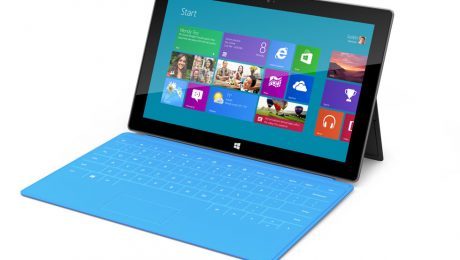
Microsoft has confirmed the arrival of its new tablet, dubbed “Surface” via press-only invitations to a launch event happening on October 25. Following the conclusion of the event, the tablets will actually be available for sale at Midnight PST via Microsoft’s website as well as the actual brick and mortar retail stores – 27 locations in the US as of this writing. The new tablet will be running Microsoft’s new operating system, Windows 8, and will come with a keyboard integrated into the built-in cover. Pricing is still not definite, but most analysts think the tablets will range in price from $500-800, making them slightly pricier than the current tablet champ, the Apple iPad.
What this means for you:
If you’ve been waiting for a “Windows” tablet with bated breath because your business is firmly entrenched in the Microsoft camp, or your IT department is slow to incorporate the beloved iPad into their technology implementations, I wouldn’t hold your breath that the arrival of Surface will change that timetable in the immediate future. Windows 8 is still very much untested in the corporate IT space, and the business world at large will be predictably slow in adopting it, as most businesses are only just starting to adopt Windows 7. Tablets, like laptops before them, represent a difficult challenge to most IT departments in terms of managing both the hardware as well as the data on them because of their highly mobile form-factor.
The arrival of a “Windows” tablet may allow for a more corporate style of tablet usage, with the underlying expectation that because the tablet is based around Microsoft technology, that it will be easier to manage from a corporate perspective and able to leverage existing investments in MS platforms. If you are the adventurous type and don’t already own an iPad or Android-based tablet, the Surface may be worth investigating, but don’t expect a robust app choice until (and if) the device can carve a niche into the existing tablet marketplace.