


The Windows 8 RTM (Release to Manufacturer) build has been available to technology professionals now for several weeks, and I recently took the plunge by installing it on my Dell Inspiron 1500 laptop. Even though my Inspiron was sold as a “Windows 8-ready” laptop, it definitely wasn’t ready for the RTM build. Despite repeated attempts to upgrade the existing Windows 7 installation (a path most folks will likely take), I ended up wiping out the entire OS and installed Windows 8 from scratch.
First, say something positive…
First impressions are important, and let me tell you, the new Windows 8 user interface is eye-popping and unlike anything you’ve seen on a desktop OS. Versions of this UI have been evolving on Windows Phones, the Xbox 360 and the Zune for months, and the designers behind the look of the OS have clearly been working very hard, and to great effect. The Windows 8 interface is a stark contrast to the shiny, chromed look of Windows 7 or OS X, using bold colors and geometric shapes in what they are calling a “tile” based interface.

It’s engaging, intuitive, and not as huge a paradigm shift in how we work as you might think. On the whole, the new OS ran as fast or faster than the previous install of Windows 7, and even though my laptop did not have a touch-enabled screen, I was able to navigate around the new interface comfortably after spending a few hours familiarizing myself without how it works.
…There’s a “but” and it’s a big one.
If Windows 8 blows your mind with its look and feel out of the gate, be prepared to have some of that wind sucked right back out of your sails. Windows 8 maybe ready for its close-up, but the rest of the world isn’t quite ready for it. Knowing this, Microsoft actually did the only thing it could do: incorporate large chunks of Windows 7 into 8 so as to maintain backwards compatibility with its gigantic (and predominantly slow-to-change) user base. This “layering” of two different OS’s will be a tremendous struggle for the average user, and it’s even a bit of a headache for seasoned technology professionals. In a nutshell, either your applications are designed for and run in Windows 8, or they run in the “desktop” layer, which is essentially a stripped down version of Windows 7. Some of them, like Google’s Chrome or even Microsoft’s own Internet Explorer, run in both environments, but they don’t use the same settings, nor do they communicate with each other! Say, for example, you have Chrome open in the desktop environment. Windows 8 alerts you via audible beep that new email has come in on your Hotmail account (which has it’s own app in Windows 8), so you punch the Windows key on your keyboard to bring up the tile interface. After reading the email, you punch the “Chrome” tile on the start page, thinking to go back to your surfing session in Chrome. Nope, that tile opens the Windows 8 version of Chrome with a blank window. To get back to your desktop session, you have to Alt-tab to the other Chrome window. As you can imagine, this will continue to be confusing until the majority of your applications live entirely in the Windows 8 world, and the desktop environment fades into memory.
What this means for you:
Unless you have a compelling reason to do so, avoid installing Windows 8 on any work computer for the time being, as at minimum you’ll be frustrated and slowed down by the awkward transition phase the new OS will be going through for the next 12-18 months. When ordering new machines, make sure (if the option is even available) to “downgrade” the installed OS to Windows 7. If you really want to try out the new Windows 8, think about purchasing a Surface tablet (arriving later this month) or installing it on a non-essential computer so you can take your time to learn the new OS without hampering your ability to get work done. If you really want to take the plunge, make sure your critical business applications and platforms can work with the new OS, and be prepared for a period of reduced productivity as you and your employees adjust to the new OS.

Have you ever opened up Facebook and noticed an ad popping up on the right hand side that seems to be eerily similar to something you were looking at/shopping for on a completely different website? Fortunately (or unfortunately, depending on how you look at it), Facebook isn’t reading your mind – instead it’s reading your browser history for behavior that aligns with one of the thousands of different ads it offers on its new Facebook Exchange (FBX) advertising platform. This particular method is called “retargeting” and is similar to technologies used by Google and Yahoo in their ubiquitous ad platforms.
Prior to the launch of FBX, Facebook sold ads based upon its extensive demographic database – advertisers could target their ads across dozens of traits including geography, age, sex, marital-status, etc. – all based upon the data that it’s 1 billion users freely share with the service in their quest to stay connected with friends and family. This method allowed Facebook to generate nearly $5 billion in ad revenue a year, but since the launch of FBX and the use of retargeting, Facebook’s new shareholders have at least one piece of good news: FBX retargeting ads are proving to be much more effective that ads sold around all the demographic data it’s been gathering for years, which means that advertisers can expect to start paying a lot more for those clicks.
What this means for you:
Let’s face it: internet advertisements are here to stay, especially since people like getting things for “free.” The savvy among you know that nothing in life is ever free, and obviously we pay for these free services with our eyeballs, and on occasion, our patronage of an advertiser. As the folks at Facebook, Google and Yahoo continue to improve the accuraccy of their advertising platforms, you can count on ads will becoming so finely tuned to their viewers, it will be like the internet was a window on our heart’s very own desires. There are add-ons you can install in Firefox and Chrome (check out the ever-popular AdBlock Plus) that will block/hide advertisements, but as websites become increasingly dependent on advertising revenue to continue delivering “free” services they will continue to find ways to make viewing advertising unavoidable. In some cases, using an adblocker will make some sites completely unusable without a lot of fiddling with settings and whitelists. If you insist on drawing a hard line in the sand about being targeted, disabling cookies will go a long way to making it impossible for sites like Facebook to track your browsing behaviors, but it will also make surfing the web a constant barrage of password prompts, preference setting and other annoyances that cookies made bearable. You can also look at services like PrivacyFix which can help you understand and control the privacy settings for the more popular sites that track your browsing history.

Numerous leaks on the internet have all but confirmed the imminent arrival of a 7-inch version of Apple’s wildly popular iPad. Expected to be announced on October 23, 2012, sightings around the internet put the new tablet starting at anywhere from $250 to $320 for a wifi-only version. Substantial rumors also point to a 3G/4G version as well, putting it an advantage over wifi-only, 7-inch Android-based tablets like Google’s Nexus 7 and Amazon’s Kindle Fire.
What this means for you:
If you are one of the few people on the planet that doesn’t already own an iPad, and don’t because of the size/weight of the current 10-inch tablet, the “iPad Mini” may be worth a look. However, 7-inch screens have many limitations when it comes to browsing the web and working in business applications – your screen real estate is literally half of what you can normally see on even the first generation iPad. Seven-inch tablets have found a very comfortable niche as e-readers, casual gaming devices, and fit remarkably well into over-stuffed carryons for frequent travelers. Expect some transition troubles for your popular iPad apps as they resize the display resolution for the 7-inch screen, and the possibility of paying for a new, “mini”-version of the same app you probably already own.
Security analysts are uncovering a troubling rise in sophistication and cunning in targeted phishing attempts – also known as “spear phishing” – where attackers are actually adapting their tactics to exploit weaknesses revealed in common business worker behavior. Most obvious and easy to exploit is the fact that many businesses “shut down” on Fridays, and most workers, including corporate IT, disengage from the job and stop reading emails. Attackers savvy to this behavior trend send out the usual phishing emails with URL’s that are actually clean at the time of delivery, allowing them to arrive in user inboxes unmolested by corporate malware detection platforms. The attacker bides his time and waits to compromise the websites that were linked in the phishing emails until the last moment, say early Monday morning, hopefully just before users start to read the email that arrived over the weekend. Because the email managed to make it past corporate filters, the user wrongly assumes it’s safe, clicks the URL and his or her computer is then compromised through the usual malware attacks.
What this means for you:
Phishing emails are becoming increasingly harder to distinguish from the real thing, and it takes a trained eye to spot the best fakes. The most common phishing tactics are to email you about the following:
- Your account has been accessed by a third party
- (Bank Name) Internet Banking Customer Service Message
- Security Measures
- Verify your activity
- Account security Notification
When you receive an email like the above, and it appears to have come from a company or institution with which you work, examine the source of the email carefully to make sure the links actually go where they say they go. (See our previous news item Ransomware Targets Skype Users for more tips on how to tell if an email is legitimate or not.) If there’s any doubt at all, don’t use the links provided, but type them in or use a bookmark you created to ensure you are going to the proper website, or call a known, publicly-available phone number for the company to verify the request with a real human.
Image courtesy of David Castillo Dominici / FreeDigitalPhotos.net

In a House Intelligence committee report released on Monday, Oct 8, 2012, US lawmakers cite security concerns with Chinese electronics manufacturing firms Huawei and ZTE. Though neither could be considered a brand recognizable in the US, both firms manufacture electronics that are used to power telecommunication devices all over the world. Though no overt wrongdoing was detected in the 9-month investigation, the report notes that the firms refused to fully cooperate with the investigation. The Chinese government is known to have a heavy hand in directing operations and even strategy for Chinese businesses, mostly to ensure tight control over national security, so it’s no wonder investigators may have encountered resistance from the companies.
What this means for you:
Independent, industry-led investigations have not found any evidence that equipment utilizing parts manufactured by either company have purposefully included security defects or “backdoors” that may have been mandated by the Chinese government as a possible means to infiltrate other countries’ data networks, though vulnerabilities have been found in older Huawei routers. Similar defects have been found in Cisco routers (an American company) which lends credence that the vulnerabilities were not state-sponsored “backdoors”, but instead a product of ongoing security research and development. The intelligence report seems to be more politically minded as opposed to highlighting a clear and present danger, focusing on “what-if” scenarios given China’s heavy-handed government, and fails to note that Chinese (or any other nationality) hackers don’t need an easy-to-detect backdoor to hack American business interests.
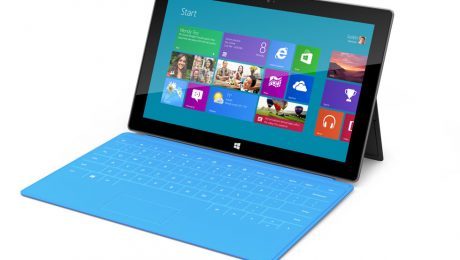
Microsoft has confirmed the arrival of its new tablet, dubbed “Surface” via press-only invitations to a launch event happening on October 25. Following the conclusion of the event, the tablets will actually be available for sale at Midnight PST via Microsoft’s website as well as the actual brick and mortar retail stores – 27 locations in the US as of this writing. The new tablet will be running Microsoft’s new operating system, Windows 8, and will come with a keyboard integrated into the built-in cover. Pricing is still not definite, but most analysts think the tablets will range in price from $500-800, making them slightly pricier than the current tablet champ, the Apple iPad.
What this means for you:
If you’ve been waiting for a “Windows” tablet with bated breath because your business is firmly entrenched in the Microsoft camp, or your IT department is slow to incorporate the beloved iPad into their technology implementations, I wouldn’t hold your breath that the arrival of Surface will change that timetable in the immediate future. Windows 8 is still very much untested in the corporate IT space, and the business world at large will be predictably slow in adopting it, as most businesses are only just starting to adopt Windows 7. Tablets, like laptops before them, represent a difficult challenge to most IT departments in terms of managing both the hardware as well as the data on them because of their highly mobile form-factor.
The arrival of a “Windows” tablet may allow for a more corporate style of tablet usage, with the underlying expectation that because the tablet is based around Microsoft technology, that it will be easier to manage from a corporate perspective and able to leverage existing investments in MS platforms. If you are the adventurous type and don’t already own an iPad or Android-based tablet, the Surface may be worth investigating, but don’t expect a robust app choice until (and if) the device can carve a niche into the existing tablet marketplace.

A new variant of the Dorkbot Worm that plagued Facebook users in late 2011 has resurfaced via emails sent to Skype users with the message reading “Lol is this your new profile pic?” The email also has a zipped attachment that contains an executable titled “skype_[today’s date]_image.exe” hoping to fool careless Skype users into thinking that the attached file is an update to their Skype software, or more foolishly somehow the above referenced profile picture. Instead, it “zombifies” the computer and, in a new twist, also installs a “Ransom-ware” form of malware which encrypts the user’s data and threatens to delete it unless a payment of $200 is made within 24-48 hours.
What this means for you:
Even if you are running the most recent and most powerful anti-virus and anti-malware software on your machine, it’s still possible for your computer to become compromised merely because you “opened the door” by purposefully running the unindentified executable. There is nothing that can prevent your computer being compromised in these types of situations except constant vigilance. Here’s what you should be watching for:
- Do you even know the sender? Do they normally email you out of the blue with an attachment? Obviously, attachments from strangers is a huge red flag!
- Is the email you’ve received characteristic of the sender? Does it have unusual spellings (or misspellings), capitalization, punctuation? Is the subject matter something you would normally discuss via email?
- Is the attachment something you were expecting, or at minimum, something you recognize? Is it normal for the sender to be sending you a file in this manner?
- If the email includes links, do the links actually go to where they say they do? For example, look at this link I made to google.com (which actually goes to bing.com). See how easy it is to fake a URL? Use your email program’s “View Source” option to check suspicious links.
- If you want to be certain, contact the sender via another means – phone, SMS, in-person – (their email account may be compromised) to verify they actually sent you a safe attachment.
Image courtesy of Victor Habbick / FreeDigitalPhotos.net

Several prominent multinational banks suffered website and online banking service disruptions over the previous two weeks as the result of focused and highly sophisticated cyber attacks. Apparently led by Middle-Eastern “Hackivists” groups in response to the “Innocence of Muslims” YouTube video controversy, researchers have indicated that unlike attacks seen in previous years, this series of attacks were well planned, highly organized and of sufficient force to have even taken down hardened and secure telecom companies who are well-versed in handling the Denial of Service attacks that are typically experienced. In these most recent attacks, the hacktivists used zombified user PC’s as well as thousands of compromised webservers to shut down bank websites for hours, and sometimes days at a time.
What this means for you:
Zombified PC’s are no good to their handlers if they are detected and sanitized before they can be “rented” out, and as such, the most effective malware infection is often one that exists quietly on your technology until it is called into service. Obviously, this could result in your computers or servers, previously well-behaved and performing normally, suddenly acting up and running slowly, usually at the most inconvenient time for you and your business. Always make sure your anti-malware software is installed, updated and working properly.
Keep in mind that it’s even possible for website engines to become compromised and used as a zombie. Unless you tend to your site regularly, it’s possible for it to become compromised without you even noticing – that is until a customer visits your website, notices something wrong, and takes the time to report it to you instead of moving on to something else. Not sure if your computers or servers are secure? Give C2 a call and let us put your mind (and business) at ease!
Image courtesy of Stuart Miles / FreeDigitalPhotos.net
![128px-Apple-logo[1].png](https://c2techs.net/wp-content/uploads/2012/10/128px-Apple-logo[1]-460x260_c.png "128px-Apple-logo[1].png")
Since its release last month, Apple has been fielding numerous complaints about wifi issues on the new iPhone 5. It’s not uncommon for manufacturers to sit tight during the first wave of complaints to see if there is any merit to them, or if they are just a combination of user-error and settling-in that always appears in new product launches. New customers were complaining of poor performance during the initial weeks of the iPhone 5’s arrival, and now that the first month’s bills are rolling in, these same customers have uncovered what looks to be a serious bug on the Verizon version of the the iPhone 5: instead of using an existing wifi connection to deliver data to the phone, iOS 6 (the operating system powering the iPhone 5) will instead continue to use the cellular connection, chewing up the monthly data allotment at an alarming rate.
Apple admitted the existence of the bug through a software update released on September 30, and Verizon has stated that no one will be charged for “unwarranted data usage” that might have occurred from this bug.
What this means for you:
If you’ve recently purchased an iPhone 5 or have upgraded your older iPhone 4 to iOS 6, and Verizon is your carrier, keep a close eye on your data usage and look for any unusual spikes in your monthly usage average. Reports are mixed as to whether this problem affects any other model other than the iPhone 5. Watch for the alert to patch your phone, and accept the update as soon as you see it. To check your cellular data usage on your iPhone: Settings->General->Usage->Cellular Usage.

The state of California just signed into law a ban on employers and universities requiring employees and applicants grant them access to their social media accounts (e.g. Facebook or Twitter). As surprising as this may seem, this was actually a thing for awhile. That is, until the internet started a ferocious publicity storm and names were named. Even still, the practice has been common enough to galvanize California lawmakers to take matters into their own hands and pass a law that in effect orders companies and universities to stop being so creepy.
What this means for you:
As of January 1, 2013, it will be illegal for you to ask your employees or applicants for access to their personal social media accounts, which will include things like Facebook, Twitter, MySpace, etc. Keep in mind, many people already openly share many aspects of their personal life (sometimes unintentionally!). As an applicant, even before it becomes an actual law, don’t let an institution or organization bully/intimidate you into this degrading invasion of your privacy.
As a business owner, employer or educator, this area is still very grey, and proper legislation is far from being clearly defined, especially as the boundaries between employees’ professional and personal lives are blurred by increasingly permissive/flexible business cultures. Remember the days when Facebook was banned at the office? Aside from the fears about wasted productivity, there were (and still are) very valid underlying concerns of mixing personal (and possibly very unprofessional) activities with business/educational pursuits. If in doubt, ask your HR representative, and check your conscience.