


Java’s recent security problems hasn’t stopped its smarmy practice of foisting the Ask-dot-com toolbar or McAfee’s Security Scanner on you every time you update Java. In case you didn’t notice, or were wondering how either of those products got installed on your computer, Java was the likely culprit. This wouldn’t be so bad, except the Java updater uses a trick called an “opt-out” checkbox which most people (who might be in too much of a hurry to get back to working|playing) just assume is part of the default Java update. If you actually look at what it’s asking you install, you’ll notice, “Hey, that’s not Java!”
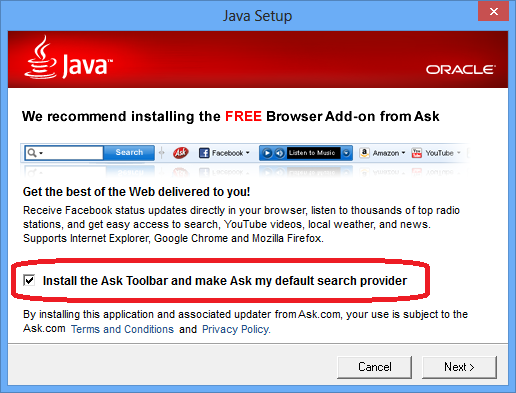
What this means for you:
If you’ve been a diligent netizen, you probably heeded the countless warnings about the latest flaw in Java and updated it when Oracle released their patch last week. If you are a normal human being, you were probably frustrated with yet another series of dialog boxes filled with barely intelligible technobabble and progress meters creeping across the screen, and you might have accidentally left that checkbox checked, which means you are the proud new owner of a questionanbly useful toolbar from Ask-dot-com. Unless you’ve fallen in love with it (for some crazy reason), I’d recommend removing this software at once.
If you want to read more about why you should do this, have a look at the ZD Net article detailing Ask’s shady takeover of your browser. I’ve not had any personal experience with McAfee’s Security Scanner, but I’ve found just about all third-party browser security “scanners” to be at best, barely functional, and at worst, completely disruptive to normal, safe browsing. Let me know if you’ve had a positive experience with either product!
According to The Verge, Google notified Microsoft of its plans to discontinue support for ActiveSync on the Gmail platform last year, and has recently notified Microsoft that the cut-off is coming on Jan 30, despite Microsoft’s efforts to get a 6-month extension from Google. ActiveSync is widely used to sync calendar and contact data from Gmail to Windows and iOS devices. Microsoft has noted that the Windows Phone OS will support CardDAV and CalDAV, which are the protocols used currently for synching on Android devices, in a future update of Windows Phone OS, but the update release data has not been announced yet.
What this means for you:
If you use Gmail as your primary calendar and contact management system, and you are syncing contacts and calendar data to a Windows Phone or an iPhone, you will lose the ability to sync up your data between phone and the cloud for an unknown length of time once Google drops support for ActiveSync – Gizmodo projects it could be as long as six months time. If you need this functionality, start considering alternatives ASAP!

Microsoft has announced that it will be raising the price of Windows 8 upgrades at the end of January to the full retail cost of $119 to $199 for the Pro version. The downloadable upgrade from Windows 7 to 8 is currently available for $39.99, and there is a boxed, retail version available for $69.99, but those prices will no longer be available on February 1.
What this means for you:
If you were at all considering upgrading to Windows 8, but aren’t necessarily ready to make the change right now, you may want to go ahead and make the purchase now and save yourself some money. Savvy technology users will have only minor issues transitioning, and Microsoft isn’t going to change their minds and rollback Windows 8, so eventually, savvy or not, you’ll probably be using Windows 8 at some point.
Keep in mind that the $39.99 price is for an upgrade version of Windows 8, so you will need a machine with a licensed copy of Windows XP, Vista or 7 to use it properly. The upgrade version cannot be easily installed on a blank computer unless you have the install media (and activation key) for your older OS handy.
Research In Motion (RIM), makers of the once-dominant BlackBerry platform, has announced the launch date of its BlackBerry 10 phones to be January 30 by all the major US carriers except Sprint, who has promised a BB10 phone later in the year. Many analysts believe that this launch is the last-ditch effort by RIM to regain relevance in an industry dominated by iPhone and Android devices, and just as many have already counted them out.
What this means for you:
If you are one of the dwindling BlackBerry faithful, there is a lot to whet your (by now, monstrous) appetite: the new RIM OS modern look and all new code-base (supposedly no carry-over code from older RIM OS’s) will hopefully update BlackBerry’s staid, corporate image. However, the new BB10 phones have multiple strikes against them:
- Developers for the “staple” apps (Facebook, Google, Netflix, etc) will undoubtedly develop versions of their omnipresent apps because they can fund the development off the backs of their profitable iOS and Android counterparts, but don’t expect surprise hits from indie developers appearing on BB10 first – there just isn’t a large enough userbase to warrant the investment gamble. RIM has sponsored some recent events to kickstart development, but proof will be in whether BB10’s launch will be a repeat of Microsoft’s Windows Phone lackluster debut.
- BlackBerry’s current infrastructure has some serious redudancy flaws that has led to some titanic outages. Once viewed as the most reliable platform in the early days of smartphones, the series of recent, widespread outages has severely tarnished RIM’s image.
- RIM has been lapped by Apple and Google, OS-wise, at least 2 to 3 times now. RIM is just launching a competitor to phone OS’s that were developed years ago. Unless this horse can fly, there is no way BB10 is catching iOS6 or Jelly Bean in this race.
I suspect that RIM isn’t quite done – they still have a nice chunk of the market, but they aren’t going to supplant iPhones or Androids anytime soon.

Facebook has announced the arrival of a new feature dubbed “Graph Search” which will allow its users to create custom pages that are built from content derived from plain-language search phrases, such as “People who like the things I like.” Graph Search will store that query as a page that can be revisited, and as new content appears on Facebook, the page will constantly update with new information.
What this means for you:
If you don’t have a Facebook account (or even if you do) you might not care much about this initially, and depending on how much of your life is lived purposefully online, you might actually be looking forward to this capability. It will definitely allow you to expand your social network in ways that previously could only happen via serendipity and active interaction. Now, you can create Graph Search pages for things like, “People who like Movies and live in Los Angeles” or “Single females living in New York, NY.” Getting a little creeped out yet? Graph Search will index every aspect of all Facebook users’ profiles, their posting history, likes (obviously) as well as everything they do that is connected to Facebook (including logins and access privileges to other websites that use Facebook as an authentication source, ie. Pinterest, Instagram, etc.) Before you completely freak out, Graph Searchers will only be able to see results that they already have access through each person’s privacy settings so it’s not like your privacy is being invaded all over again.
But, if you’ve been on Facebook a while, it’s quite possible you’ve posted pictures or comments or other activities that you might have forgotten about. At the time, it was just a harmless picture of you doing a keg stand with your fraternity brothers, right? Quote: “I really like beer.” Graph Search: “People who live in Los Angeles and like beer.”
It might be time to go through your Facebook albums and scrub that timeline, no?

Carnegie Mellon University’s CERT and the Department of Homeland Security have issued a broad warning about using the latest version of the Java 7 plug-in for web browsers, and some browser manufacturers have already taken steps to disable Java application execution until the vulnerability can be fixed. The security flaw is already being exploited in the wild, and can be used to run malicious code without the victim’s permission or even awareness. Oracle is investigating, but has not indicated when the hole would be patched, aside from promising a fix “shortly.”
What this means for you:
Unless you have a really good reason to keep running it, you should probably disable Java until Oracle can fix this problem. Unlike other vulnerabilities that affect specific browsers (Internet Explorer has been notorious for flaws in the past), this particular problem affects all browsers that have a Java 7 plugin, including the Apple OS. Oracle has had problems in the past with providing quick patches for the Java platform, so until they do, the safest approach is to disable the plugin in your browser.

Over the past four months, many of the Western world’s largest banking institution websites have been under attack by a well-organized and funded cyber “brigade” that is allegedly part of the US-branded terrorist group “Izz ad-Din al-Qassam” – the military arm of Hamas. Aside from the publicly-stated political agenda motivating the attacks, little else was known about how the attacks were being carried out. Security analysts believed that rather than using large numbers of zombified consumer computers, this series of attacks were actually being powered by a smaller number of more-powerful webservers.
Security firm Incapsula confirmed this theory after recently discovering that a single UK webserver was behind a most recent attack on PNC, HSBC and Fifth Third banking websites. The server had been compromised with a simple backdoor program that allowed a remote operator to launch DDoS-style attacks using a simple, light-weight interface that may have been operating for months unbeknownst to the host or the server’s legitimate admin. Even though it was a single, relatively small server, it was capable of crippling websites of major financial institutions.
What this means for you:
The server in question wasn’t compromised using some sophisticated exploit, brute force attack or clever social engineering. According to Incapsula, the server was using an easily guessable admin password that resulted in an effortless and undetectable security breach. As consumer technology has become more accessible, so have server-class platforms that can be rented out by anyone with a credit card, and typically can be set up in minutes with only a rudimentary knowledge of server administration. This results in situations that look a lot like handing a powerful weapon to someone who has only been given very basic instructions on which end to hold and which end to point at the target. However, in the hands of a skilled hacker, a small “team” of compromised webservers is the equivalent of having a small special forces team operating behind enemy lines. Bottom line – if you have servers in your technology portfolio that aren’t being managed properly, your own technology might be waging an invisible war right under your nose.
Image courtesy of “renjith krishnan” / FreeDigitalPhotos.net

According to security firm Exodus, the patch to Internet Explorer 6, 7 and 8 released on December 31 only fixed one of several ways to exploit a weakness in Microsoft’s browser. In their research on this exploit, Exodus continued to develop more aggressive ways to exploit the documented weakness and in doing so, uncovered a means that bypasses Microsoft’s fix, but are witholding details from the public until Microsoft has a chance to address their findings. A number of human rights and government sites have been compromised with malware agents that exploit this weakness and appears to be part of a larger campaign by the “Elderwood Gang” – a highly effective and well-backed group of hackers that have been targeting high-profile government sites since 2009, ostensibly with financial and espionage-based goals.
What this means for you:
Internet Explorer 6, 7 and 8 are still considered vulnerable, though no one has documented any websites yet taking advantage of the exploits discovered by Exodus. The fact that there are still holes in IE browser security will not go unnoticed, and if Exodus can develop work-arounds for Microsoft’s patch, you can bet groups like “Elderwood” will be able to do the same, if they haven’t already. Your best short-term solution is to either use another browser like Chrome or Firefox until Microsoft can fully patch this weakness, or upgrade your Internet Explorer to version 9 or 10 as soon as possible. If you are working for an organization or using software that requires backward compatibility to IE 7 or 8, you should consider having a serious discussion with the IT department about their reasons for maintaining what is increasingly becoming an untenable stance. If you are required to use IE 6 for some unfathomable reason, you should stop what you are doing immediately and consult with an IT professional, as IE 6 is a magnet for security exploits.

Thanks to the commoditization of computer hardware, it’s possible to buy a serviceable laptop that costs less than $500 brand new. This has resulted in many companies relaxing the restrictions they had on their purchase and use, but a small healthcare provider in North Idaho learned a harsh lesson that hardware costs are the least of their worries when it comes to losing a laptop. The Hospice of North Idaho recently had a laptop stolen that contained unencrypted, sensitive personal information on over 400 of their patients, and because this is a violation of the Health Insurance Portability and Accountability Act, the Department of Health and Human Services is slapping the non-profit hospice with a $50,000 fine.
What this means for you:
Even if you aren’t a healthcare provider, being aware of the data on your company’s laptops should be a top concern, regardless of whether you think the data doesn’t fall into the protected class outlined by HIPAA. Mobile electronics, like laptops and smartphones are a prized target of thieves, on top of being ridiculously easy to damage and/or misplace all on their own. If your laptops are used heavily on the road, you should consider encrypting some or all of the data on the device, as well as making sure employees are using physical security devices like cable locks whenever the laptop is set down for more than 5 minutes, even if in a “secured” working environment. If your smartphone has access to any company or customer data, you should have auto-locking enabled and at least a 6-digit pin or password to unlock it. Cable locks won’t stop a determined thief, but it will deter most casual theft, and data encryption + passwords will make sure you never have to have that meeting with a client (or worse, a prospect) to let them know that their data might be at risk.
Image courtesy of “cooldesign” / FreeDigitalPhotos.net

A recently published whitepaper from Redwood, CA security firm Imperva reports a disturbing trend that many technology professionals already suspected: current anti-malware manufacturers can’t keep up with the pace of virus development now that malware has moved from the realm of mischief to big-time criminal enterprise. Researchers from Imperva and students from Technion-Israel Institute of Technology put together a study that pitted 80 new viruses against over 40 of the top commercial antivirus products on the market, including Symantec, McAfee and Kaspersky and found that they were only able to detect 5% of the new malware infections.
It’s important to note that the sponsor of this study, Imperva, has a material stake in future anti-malware development, as their focus has been on developing a method of protection that differs from the traditional signature detection approach used by the mainstream antivirus developers. Signature detection relies on antivirus manufacturers being able to “capture” and reverse-engineer a computer virus strain to develop ways to combat infection, a process that is entirely reactive and time-consuming. As you might have guessed, new viruses can do their damage in minutes on a vast scale thanks to the internet, so relying on protection developed after the virus has been in the wild is of no help to those already infected. Cybercriminals realize they have the advantage of surprise on their side, and are investing heavily in staying ahead of signature detection algorithms.
What this means for you:
Future security is going to rely heavily on a combination of methods: signature detection, heuristic analysis (watching for anomalous behavior), virtualization/compartmentalization and good old fashioned paranoia/preparedness. The public at large has been lulled into a false sense of security in thinking that purchasing a product off the shelf will absolve them of the need to remain vigilant. As some of my clients can personally attest, you can have the best antimalware products on the market and still get infected. Technology security is more than purchasing software and hardware – it’s a process and state of mind that must constantly be maintained. If you are uncertain how to evolve your business practices to step up your state of readiness, give C2 Technology a call – we can help!
Image courtesy of graur razvan ionut / FreeDigitalPhotos.net